Exploring the Difference Between WatchGuard T Series & WatchGuard M Series Firewalls

What’s the difference between WatchGuard T Series firewalls & M Series firewalls?

WatchGuard’s next generation Firebox firewalls are great for small businesses and mid-sized organizations alike, with a range of options to fit offices of any size. Whether you’re looking for unified threat protection and easy management, or just additional protections for an existing network, the WatchGuard T Series and WatchGuard M Series firewall families offer versatility and scalability at an affordable price point. It can be a challenge to compare WatchGuard firewalls, especially if you’re not sure of the differences between WatchGuard’s T Series and M Series.

WatchGuard T vs M Series form factors & connectivity

If you’re looking for big security in a small package, WatchGuard T Series firewalls are compact security dynamos with tons of features to keep even the most hands-on network administrator happy. In terms of form factor, T Series firewalls are desktop models made to be small enough to sit next to your favorite coffee mug.

WatchGuard M Series firewalls are larger appliances, made to fit into a standard 19″ server rack. These firebox appliances are 1RU (or rack unit) high, so they don’t take up a lot of space when properly mounted. WatchGuard T Series firewalls can also be made to fit into a 19″ rack by using a compatible rackmount kit if you so desire.

WatchGuard T Series firewalls like the Firebox T15, Firebox T35, & Firebox T55 can also be purchased as wireless appliances, meaning wireless connectivity, fewer wires, and simpler installation in otherwise tricky environments where wired options would prove subpar. WatchGuard M Series firewalls are not able to offer wireless access. There is just too much performance and advanced security going on to stream over the air!

WatchGuard T vs M Series sizing, throughput, & VPN

While physical size of the firewall may be important, more crucial to your decision as a buyer is the ability to correctly “size” a firewall’s security capabilities for your network needs. Firewalls.com considers any device including laptops, mobiles, printers, IoT, and all other connected entities on your network as “users” when discussing recommended user counts.

WatchGuard T Series firewalls are made for small businesses. The Firebox T15 at the smaller end of the scale is able to easily secure one to 10 users, while the higher-end Firebox T70 is a good fit for up to 50. Similarly, the WatchGuard M Series can range from around 50 to 100 users for the more modest Firebox M270 while the gargantuan Firebox M5600 will comfortably secure well over 2,500 users.

With many companies now working remotely, the ability for your firewall to secure remotely connected employees is also critical. For most companies, that means setting up VPN tunnels between remote employees’ home offices and the company network. Different firewalls have different capabilities when it comes to the number of VPN tunnels they can support, so be sure to talk to an expert if you’re looking to get employees working from home on a WatchGuard firewall.

These differences in user count recommendations boil down to how much throughput power the appliances can handle, how many concurrent connections the device can support at once, and what levels of advanced security services, remote connectivity, and encryption your network requires. Also keep in mind that bigger firewalls often mean more interfaces and ports to access. All of this information can be found in detail inside a product datasheet. And take a closer look at the T35 and T55 firewalls with our feature review video.

WatchGuard T Series at a Glance

  • WatchGuard Firebox T15 -Firewall Throughput: 400 Mbps/Concurrent Connections: 100,000/VLANs: 10
  • WatchGuard Firebox T35 -Firewall Throughput: 940 Mbps/Concurrent Connections: 1,300,000/VLANs: 50
  • WatchGuard Firebox T55 -Firewall Throughput: 1.0 Gbps/Concurrent Connections: 1,300,000/VLANs: 75
  • WatchGuard Firebox T70 -Firewall Throughput: 4.0 Gbps/Concurrent Connections: 800,000/VLANs: 75


WatchGuard M Series at a Glance

  • WatchGuard Firebox M270 -Firewall Throughput: 4.9 Gbps/Concurrent Connections: 2,000,000/VLANs: 10
  • WatchGuard Firebox M370 -Firewall Throughput: 8.0 Gbps/Concurrent Connections: 3,300,000/VLANs: 200
  • WatchGuard Firebox M470 -Firewall Throughput: 19.6 Gbps/Concurrent Connections: 3,800,000/VLANs: 300
  • WatchGuard Firebox M570 -Firewall Throughput: 26.6 Gbps/Concurrent Connections: 8,300,000/VLANs: 500
  • WatchGuard Firebox M670 -Firewall Throughput: 34.0 Gbps/Concurrent Connections: 8,500,000/VLANs: 750
  • WatchGuard Firebox M4600 -Firewall Throughput: 40.0 Gbps/Concurrent Connections: 7,500,000/VLANs: 750
  • WatchGuard Firebox M5600 -Firewall Throughput: 60.0 Gbps/Concurrent Connections: 12,700,000/VLANs: Unlimited


What is EDR? Automated endpoint detection & real-time response to threats

To continue our recent theme of decoding abbreviations, EDR means Endpoint Detection & Response, and that means that the age of AI is upgrading networks. This automated, real-time endpoint solution ensures that end users can work securely no matter where in the world they’re located in relation to a firewall.

With EDR, your network defenses constantly scan for the kinds of elusive malware, ransomware, and zero day threats that signature-based detection platforms miss. And in the event a security incident occurs, advanced Endpoint Detection & Response platforms such as Sophos Intercept X Advanced with EDR or FortiEDR stop attacks even if the endpoint is compromised. Guided response lets administrators easily walk through the steps of an attack to see its root cause and isolate infected machines.

EDR’s machine learning systems deter, detect, disarm, dissect, deescalate, and do away with any cyber threats you can throw its way.

Why EDR works for small businesses

Survey after survey several years running have revealed two facts: a majority of small businesses find it difficult to hire qualified IT talent–especially talent focused on network security–and their budgets often struggle to accommodate the talent they do find. Automated endpoint detection and response monitored by 24-hour machine learning intelligence adds just the kind of cybersecurity expertise that SMBs need without a higher employee headcount.

Just like modern grocery stores have self-checkout lines and autoworkers now benefit from the assistance of robotics, automation enables small businesses to do more with less to get the job done. Farm out malware expertise and incident response to the bots!

Sophos Intercept X Advanced with EDR

Intercept X Advanced has been a longstanding go-to for network admins looking to add advanced protection to their networks in a comprehensive, integrated system. Sophos Intercept X Advanced now also consolidates that industry-leading protection and EDR into a single solution. Intercept X’s advanced malware prevention significantly eases the workload on the EDR component, allowing you to utilize more of the speed and performance you pay your Internet Service Provider for.

  • Minimize staffing by automating IT tasks usually done by skilled experts
  • Prioritize potential threats & automatically detect security incidents
  • Provide visibility into attack scope, root cause, impact, & network health
  • Hunt for indicators of compromise that may leave your network vulnerable


Fortinet FortiEDR

FortiEDR will be made available to order on May 4th and is already boasting some big benefits and features. An EDR solution purpose-built to detect potential threats, FortiEDR stops breaches in real time, and mitigate the damage of ransomware even on machines that have already been compromised. FortiEDR also extends security to IOT devices with the ability to protect everything from PCs to servers to point-of-sale systems and more.

  • Creates very small network footprint thanks to native cloud infrastructure
  • Enjoy automated EPP with orchestrated response across platforms
  • Stop file-based malware with Fortinet’s kernel-level Next Gen AV engine
  • Eliminate dwell time & reduce post-breach expenses


SonicWall Capture Client

Automated endpoint detection and response is integrated into SonicWall’s Capture Client, bringing together EDR, advanced threat protection, and integrated network security. With unique ransomware rollback capabilities and intuitive attack visualizations, Capture Client offers a comprehensive endpoint protection and EDR environment for any SonicWall network.

SonicWallEDR

  • Next-generation SentinelOne malware protection engine
  • Advanced threat protection with sandbox integration
  • Behavior-based scanning powered by machine learning
  • Unique attack rollback capabilities using Volume Shadow Copy Service
  • Install & manage trusted TLS certificates to leverage DPI-SSL


Network Security from Home – Ping Podcast – Episode 17

Episode 17: Network Security from Home

On Episode 17 of Ping: A Firewalls.com Podcast, Kevin and Andrew welcome back returning guest Daniel Kremers from SonicWall to discuss network security for the home office and for remote workers in general. He talks about when a home office firewall makes sense and how it can help. He also offers other work from home security tips about passwords, cloud applications, and VPN to name a few.

Learn about one of those home office firewall options, the SOHO 250 including a special trade up promo on now.

And browse the blog for even more guidance on security in the time of remote work. We even talked about it on our last episode as well.

In our cyber headlines segment, we talk Zoom’s cybersecurity concerns, the virtual/real NFL Draft (including a break for a special social distancing mock draft), and the surprising ubiquity of COBOL.

How to listen

Listen to Ping – A Firewalls.com Podcast using the player above…

Or just about anywhere you prefer to listen to podcasts (Apple Podcasts, Pandora, Spotify, Google Podcasts, Stitcher, Overcast, TuneIn, iHeart, Pocket Cast, Castro, Castbox, Podchaser, YouTube, and of course via RSS, to name a few). Remember to subscribe or follow where you can to get the latest episodes as soon as they’re released, and rate and review us as well!

Missed our previous episodes? You can get them anywhere you listen to podcasts, or go to our full episode list.

New episodes are released every other Wednesday. Have a special request for a topic or a question for our network engineers to address? Email us at podcast@firewalls.com and it could be on our next show!


Sophos SD-RED 20 & 60: Synchronized SD-WAN

Just in the nick of time for our strange days of full-capacity remote work, Sophos releases a new heir to the secure remote access throne with a replacement for their mainstay Sophos RED appliances. The new Sophos SD-RED 20 and Sophos SD-RED 60 bring together secure, encrypted SD-WAN capabilities and the Sophos Synchronized Security flagships XG Firewall and Intercept X. These unique and simple remote work solutions extend network connectivity to remote branches, distributed offices, outposts, home offices, and any other remote workers, no matter where they’re located. Whether you need stable remote access at a mountaintop observatory or in your new sealab, Sophos SD-RED appliances have you covered with stable, secure access and real-time visibility.

Other new features include SFP ports, Power-over-Ethernet capabilities for the SD-RED 60, huge improvements in throughput, and more interfaces than previous Sophos RED devices. The Sophos SD-RED appliances work seamlessly with Sophos wireless access points and the SD-RED 60 could even support two Sophos access points with Power-over-Ethernet alone!

Blog Banner General Buy Now Red-High-Quality

SD-WAN gets a heartbeat

When an SD-RED appliance is centrally managed through the XG Firewall platform (free trial?), admins can extend Synchronized SD-WAN to multiple branch locations. Synchronized SD-WAN means that not only are you replacing expensive and unstable MPLS connections with super intelligent SD-WAN capabilities, you’re also protecting traffic that traverses those SD-WAN connections with the same Synchronized Security & Sophos Security Heartbeat features that employees would enjoy on the home network.

So easy a home user can do it

Due to COVID-19, many small businesses now have employees working from home that may have no prior experience with remote work before the big change. SD-RED appliances ease the pressure of extending your secure network to remote workers with a truly plug-and-play, zero-touch deployment. No technical skill is required for remote workers or branch locations to install an SD-RED 20 or SD-RED 60. Just type the device ID into your Sophos firewall appliance and ship your SD-RED appliance to its destination. Once the device is received and plugged in, the SD-RED will connect to the Internet, call back home to your primary firewall, and automatically establish a secure VPN tunnel with auto-provisioning.

Sophos RED vs Sophos SD-RED

So how do these new remote access devices stack up against their predecessors? Check out our handy comparison table or keep scrolling to see new throughput improvements, expanded interfaces, and more to compare the original RED to the new, improved SD-RED.

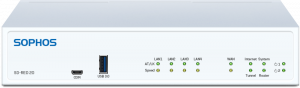
Sophos SD-RED 20

Sophos SD-RED 20

  • Maximum Throughput: 250 Mbps
  • LAN Interfaces: 4 x 10/100/1000 Base-TX (1 GbE Copper)
  • WAN Interfaces: 1 x 10/100/1000 Base-TX (shared with SFP)
  • Power-over Ethernet Ports: None
  • USB Ports: 2 x USB 3.0 (front and rear)


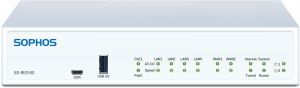
Sophos SD-RED 60

Sophos SD-RED 60

  • Maximum Throughput: 850 Mbps
  • LAN Interfaces: 4 x 10/100/1000 Base-TX (1 GbE Copper)
  • WAN Interfaces: 2 x 10/100/1000 Base-TX (shared with SFP)
  • Power-over Ethernet Ports: 2 PoE Ports (total power 30W)
  • USB Ports: 2 x USB 3.0 (front and rear)


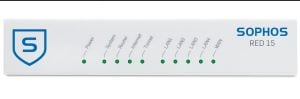
Sophos RED 15

Sophos RED 15

  • Maximum Throughput: 90 Mbps
  • LAN Interfaces: 4 x 10/100/1000 Base-TX
  • WAN Interfaces: 1 x 10/100/1000 Base-TX
  • Power-over Ethernet Ports: None
  • USB Ports: 1 x USB 2.0


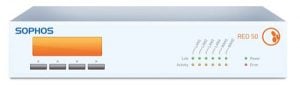
Sophos RED 50

Sophos RED 50

  • Maximum Throughput: 360 Mbps
  • LAN Interfaces:4 x 10/100/1000 Base-TX
  • WAN Interfaces: 2 x 10/100/1000 Base-TX
  • Power-over Ethernet Ports: None
  • USB Ports: 2 x USB 2.0

Blog Banner General Buy Now Red-High-Quality

Buy Sophos SD-RED

Ready to get your hands on Synchronized SD-WAN? These new SD-RED appliances are ready to ship now! With the Sophos RED 15 potentially looking at backorders in the wake of the remote work rush, the SD-RED 20 and 60 have landed just when they are needed most. Synchronize your SD-WAN and secure your remote workforce today!


Pod from Home – Ping Podcast – Episode 16

Episode 16: Pod from Home

On Episode 16 of Ping: A Firewalls.com Podcast, Kevin and Andrew share Tales from Home, as they – like many – have recently joined the ranks of remote workers due to the coronavirus. They talk about their work from home setups and schedules – along with things they appreciate and miss about the office. They also discuss some tips for employers and employees about handling the sudden influx of work from homers, with mentions of VPN, multifactor authentication, and more. Plus – listen for a couple of binge watch recommendations for your spare home time.

Get even more info on remote workforce network security guidance by visiting our blog.

In our cyber headlines segment, we continue the theme of the moment, talking Covid-19-related work from home security issues (with a special guest appearance from Andrew’s dog Raven), hackers targeting the World Health Organization (WHO), and a global group of cybersecurity experts teaming up to fight coronavirus-related attacks.

How to listen

Listen to Ping – A Firewalls.com Podcast using the player above…

Or just about anywhere you prefer to listen to podcasts (Apple Podcasts, Spotify, Google Podcasts, Stitcher, Overcast, TuneIn, iHeart, Pocket Cast, Castro, Castbox, Podchaser, YouTube, and of course via RSS, to name a few). Remember to subscribe or follow where you can to get the latest episodes as soon as they’re released, and rate and review us as well!

Missed our previous episodes? You can get them anywhere you listen to podcasts, or go to our full episode list.

New episodes are released every other Wednesday. Have a special request for a topic or a question for our network engineers to address? Email us at podcast@firewalls.com and it could be on our next show!


← Older posts Newer posts →