FortiClient: Next gen endpoint protection & remote access

Advanced network security, simplified

Fortinet FortiClient is purpose-built to simplify advanced security capabilities, so even small business owners with limited IT staff or resources can roll out enterprise-grade networking. Looking to keep remote worker endpoints sanitary? FortiClient unifies all the endpoint features you expect out of a premium end user platform including secure remote access, sandboxing, and behavior-based scanning for ransomware and encrypted malware.

Fortinet brings it together with seamless Security Fabric Integration, ensuring that all of the Fortinet security fabric components such as FortiGate Firewalls, FortiAnalyzer, wireless APs, and managed switches share a unified view of every endpoint. Automated advanced threat prevention through the use of FortiSandbox catches both known and never-seen-before threats. This integrated framework is centrally managed on the single-pane-of-glass dashboard offered through a FortiGate next generation firewall. This is fast to set up, too! You’re one FortiClient download away from securing all of your endpoints, on-premise or remote. Activation codes are typically delivered next business day.

Remote access with auto-connecting FortiClient VPN

With companies rushing to get remote workers set up on secure remote connections, many small business owners are turning to FortiClient VPN which takes advantage of both SSL VPN and IPSec VPN to provide secure remote access over the fastest and most stable protocol available. This means almost any Internet-connected location can offer secure access to company applications and resources, regardless of the details of its environment. FortiClient automatically connects endpoints to VPNs and maintains an always-up connection, so remote workers require little to no training on how to connect to a VPN from home – or anywhere else.

FortiClient increases visibility & control over endpoints

FortiClient provides end-to-end visibility into all of the endpoints on a network, allowing administrators to view endpoint health at a glance. By integrating endpoints into the Fortinet Security Fabric, the endpoint protection systems, firewall, and security services on the network communicate in real-time to ensure system compromises never go unnoticed. This translates into early detection for network administrators in case of an attack, allowing IT teams to respond quickly.

The FortiOS 6.0 operating system enables endpoint telemetry intelligence, which accurately identifies Indicators of Compromise. Fortinet determines what constitutes an Indicator of Compromise by checking real-time web filter logs on each endpoint against a threat database groomed by FortiGuard Labs. If a potential match is flagged, Fortinet assigns a threat score to that endpoint, measuring overall end user health and reporting this data back to a centrally-managed dashboard through the FortiGate firewall. Plus, network administrators love the automated response capabilities that FortiClient’s telemetry allows, letting them quarantine suspicious endpoints on the fly.

Stop advanced threats like ransomware

FortiGuard Labs provides up-to-the-second threat protection based on real-world data collected from security sensors around the globe. FortiSandbox harnesses this threat intelligence for behavioral scans of all files & applications present on FortiClient endpoints. That means even if threats are hidden in encrypted data packets, FortiClient will root them out and send them to quarantine before any payloads can detonate. Email-borne threats–especially dangerous to remote workers–are blunted thanks to these real-time scans and shared intelligence.
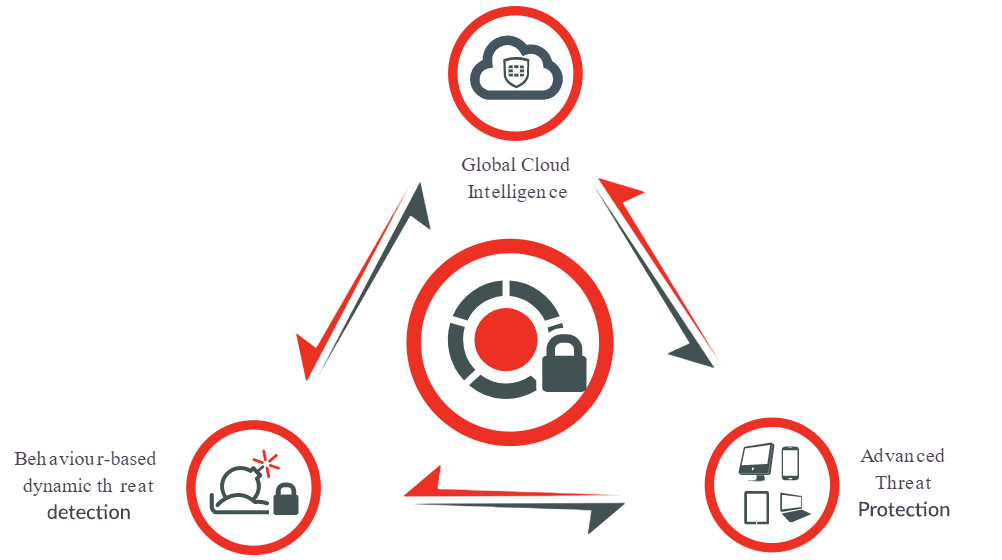
Advanced Threat Protection with FortiClient next generation endpoint

Don’t believe us that FortiClient is a next generation endpoint service? Industry validation titans such as NSS Labs and Gartner consistently stand behind this solution, providing top marks for FortiClient in annual benchmarking tests. In the NSS Labs 2019 Advanced Endpoint Test, Fortinet’s FortiClient blocked 100% of malware thrown at it. See how to get FortiClient for your business.




4 questions SMBs should ask about SonicWall VPN

Small business owners rushing to get their hands on a SonicWall VPN for their remote workers have a lot of questions. We have a lot of answers. Below are the four questions that business owners and network administrators should be able to answer before they buy a SonicWall VPN solution and get their employees working from home.

1. SSL VPN or Global VPN Client?

If you’re shopping for a SonicWall VPN, your first question is probably: what kinds of SonicWall VPN solutions are there? SonicWall offers both SSL VPN and Global VPN Clients. You can take a closer look on our SonicWall VPN comparison page, but here are a few key differences:

  • Global VPN Clients are best used in Windows-only environments
  • SSL VPN is better suited to mixed-use environments where employees use many device types
  • Global VPN Clients can be a bit harder and more costly to install, especially for smaller businesses
  • SSL VPN is delivered in a client that won’t eat up a lot of resources
  • Price-wise, both SonicWall VPN options are about the same
  • Global VPN Clients use IPSec to connect hosts to entire private networks
  • SSL VPNs connect users to specific services & apps inside secure networks

Blog Banner General Buy Now Red-High-Quality

2. How many SonicWall VPNs does my firewall support?

Did you know that all SonicWall TZ and NSa firewalls include at least one SSL VPN or Global VPN license? However, each firewall model has a maximum capacity of clients that it can connect to and protect. After this threshold, service becomes spotty, slow, and unsecure!

In most cases, a firewall can support more Global VPN licenses than it can SSL VPN licenses. However, small business owners may lean towards SSL VPN because TZ firewalls actually support far more SSL VPNs than they do IPSec clients.

  • SonicWall SOHO 250 – supports 5 Global VPN Clients & 25 SSL VPN licenses
  • SonicWall TZ 300 – supports 10 Global VPN Clients & 50 SSL VPN licenses
  • SonicWall TZ 350 – supports 10 Global VPN Clients & 75 SSL VPN licenses
  • SonicWall TZ 400 –  supports 25 Global VPN Clients & 100 SSL VPN licenses
  • SonicWall TZ 500 – supports 25 Global VPN Clients & 150 SSL VPN licenses
  • SonicWall TZ 600 – supports 25 Global VPN Clients & 200 SSL VPN licenses

3. How do I increase performance for remote workers?

SSL VPN licenses require a lot of performance to process all of the secure data they transfer and inspect. Setting up a dedicated Secure Mobile Access appliance such as a SonicWall SMA 210 or SonicWall SMA 410 remote access appliance can greatly improve speed, uptime, and stability for your employees working from home, lessening the burden on your firewall.

The Firewalls.com Remote Worker Bundle combines Secure Mobile Access appliances, SonicWall VPN licensing, and our expert professional configuration services in a comprehensive package to get your workers setup at home fast. The bundle includes a SonicWall SMA 210 or 410 appliance with a 5 user license, expert setup assistance, and a free configuration to make the transition seamless.

4. How do I provide extra protection for remote workers?

Just because your employees are working from their couch doesn’t mean your security can slouch. The fact is, hackers always find a way to exploit the hottest news in the world to their benefit. Expect attackers to target home users with spearphishing, social engineering, encrypted malware, and more. Now is the time to ensure your mobile workers are locked down with advanced network security solutions like SonicWall’s Capture Advanced Threat Protection for SMA, extending the same great cloud-based multi-engine sandboxing protection to your secure access infrastructure that networks worldwide enjoy through a high-end firewall.

Blog Banner General Buy Now Red-High-Quality


How to Choose a Cisco Meraki Firewall for your Small Business

Shopping for Cisco Meraki MX Firewalls

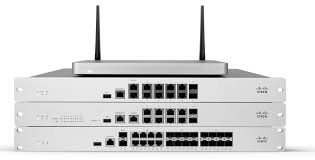
Cisco Meraki MX Security & SD-WAN Appliances (or as we affectionately call them: firewalls) provide Unified Threat Management for small businesses, branch offices, datacenters, and distributed enterprise environments. 100% cloud managed and filled to the brim with comprehensive security features, Cisco Meraki firewalls reduce complexity and save money by eliminating the need for multiple appliances.

Why Meraki Firewalls?

As small businesses explore digital transformation and all the advanced security and networking that it offers, automated services become more important. Cisco Meraki MX firewalls make intelligent site-to-site VPN easy with Auto VPN. Auto VPN automatically generates VPN routes using IKE/IPSec that can connect with all IPSec VPN devices and services. Automated MPLS to VPN failover in case of a connection failure is resolved in a matter of seconds, minimizing downtime over remote access.

Blog Banner General Buy Now Red-High-Quality

SD-WAN is another key aspect of digital transformation and Cisco Meraki includes SD-WAN capabilities with each firewall. Software-defined WAN lowers operational costs and improves performance of remotely-accessed resources. Policy-based routing, support for application-layer profiles, active/active VPN, and dynamic path selection ensure the apps and services your employees use most are always available.

Cisco Meraki MX firewalls include all the advanced security services you expect out of a next generation firewall: intrusion prevention powered by Cisco-developed SNORT, content filtering, anti-malware, geo-based firewalling, remote access connectivity, and advanced malware protection. Layer 7 fingerprinting allows small businesses to identify PUAs and unproductive content so that company bandwidth isn’t wasted on time-wasters like BitTorrent.

Choosing a Cisco Meraki MX Firewall

It can be a challenge to spot the difference between two similar firewalls, but the devil is always in the details. Here are a few key differentiators between Cisco Meraki firewalls to help you decide which device is right for your network.

Power of Ethernet

The Cisco Meraki MX68 includes Power-over-Ethernet capabilities. The rear of these MX firewall models feature a pair of 802.3at (PoE+) ports. With them, you get built-in power supply capabilities for tricky installations where outlets may be unavailable. These two 802.3at ports provide a total of 60W power. In other words, you can leave the AC adapters at home.

Integrated 802.11ac Wave 2 Wireless

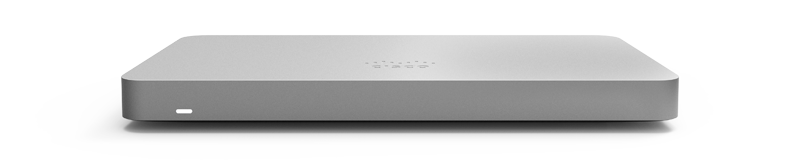
The MX67W and MX68W provide wireless firewalling capabilities, integrating Cisco Meraki’s industry-recognized wireless technology in an SMB-friendly compact form factor. Enjoy unified central management of all network security and wireless devices.

Blog Banner General Buy Now Red-High-Quality

Meraki vMX100 Virtual Firewall

Virtual firewalls provide the benefit of simple configurations and appliance-less deployment. The Meraki vMX100 is added via Amazon Web Services or Azure and configured directly in the Meraki dashboard, just as you would manage any other MX firewall appliance. Licensing only–no on-premise equipment required!

Cisco Meraki MX64 vs MX65

At first glance, these two models look pretty similar. Both clock in at 200 Mbps of Advanced Security Throughput (when the full range of intelligent security services are operating). They also offer 100 Mbps of VPN Throughput. The MX64 can be converted to support WAN and includes 3 dedicated GbE RJ45 interfaces. Why aren’t we talking more about the MX65? Because it reached end of sale in 2019 and is no longer available. If you’re looking for something comparable – the MX68 is your best bet.

Cisco Meraki MX67 and MX68

Meraki MX67 and MX68 firewalls are designed with built-in cellular modems that simplify deployments requiring a cellular uplink backup. This kind of cellular uplink infrastructure is ideal for remote locations that rely on continuous WAN circuits. That is to say, where you need high availability and redundancy, the cellular uplink provides a valuable backup.

The MX68 includes the Power of Ethernet capabilities described in the section above as well as dual WAN interfaces and 10 LAN RJ45 interfaces. On the other hand, the MX67 includes only one dedicated WAN interface and three LAN RJ45 interfaces.

Meraki MX84, MX100, MX250, & MX450

The Cisco Meraki MX84 and above appliances pack a bit more punch behind their security performance.

    • MX84 Recommended Users & VPN Throughput: 200 users, 250 Mbps
    • MX100 Recommended Users & VPN Throughput: 500 users, 500 Mbps
    • MX250 Recommended Users & VPN Throughput: 2,000 users, 1.0 Gbps
    • MX450 Recommended Users & VPN Throughput: 10,000 users, 2.0 Gbps

In sum, it’s clear these models are designed for medium branches and enterprise networks. With top-end speeds up to 6.0 Gbps of stateful firewall inspection, the advanced security technology behind Cisco Meraki MX firewalls bring serious security and performance.

Blog Banner General Buy Now Red-High-Quality

Advanced Security Licenses and Support

Check out our Renewals & Licensing wizard to find advanced security licenses for Cisco Meraki MX firewalls like Cisco Meraki Advanced Security Licensing.


Remote Worker Bundle options make working from home fast & secure

Small businesses are rushing to get their employees working from home. The popularity of virtual conferences and webinars has skyrocketed in response to the threat of coronavirus, influenza, daycare emergencies, potholes, perilous traffic, and political ads on the morning commute. If you’re looking to keep your workforce out of harm’s way, our new Remote Worker Bundle comes with everything you need to maintain network security while employees work from home. Establish fast, safe remote access with a SonicWall SMA 210 or SonicWall SMA 410 expertly configured for your unique network demands, then pair it with 24×7 Support to make the experience flawless for remote employees.

Security risks posed by working from home represent just one problem surrounding secure remote access. Ensuring that the home experience is simple and seamless is integral to maintaining productivity. In addition, small businesses struggle with issues of flexibility, compatibility, and scalability. The Remote Worker Bundle tackles these issues with affordable add-on options for technical support and further concurrent user licensing.

Benefits of the Remote Worker Bundle

When workers come into the office sick, they risk spreading illnesses to the whole staff, but self-quarantining at home doesn’t mean the work has to stop! Our Remote Worker Bundle includes all the fundamental pieces organizations need to set up basic work-from-home security for their employees. Projects never need to be put on pause when remote workers are able to work with all of the company resources and apps they’re used to at their workstation. This bundle is also ideal for any company with a high volume of business travel.

Flexible, scalable remote access for all

SonicWall SMA appliances are compatible with any firewall brand or model you may already be using. Remote workers will be able to access any company printers, applications, files, or cloud resources from the comfort of their home while their session sits behind the same company firewall that protects their data in the workplace! SonicWall’s SMA 210 and SMA 410 appliances are compatible with any cable or DSL connection from any Internet service provider, meaning whatever Internet provider your workers already have at home will work.

Need to add more users? The SMA 210 can support up to 50 users with concurrent licensing and the SMA 410 can protect up to 250 remote workers at once. The best part? Because these stackable user licenses are perpetual, you’ll only ever pay for each user one time–no need for renewals.

Remote worker bundle: configuration included

Ready to wash your hands of remote security risks? To provide secure network access for employees working from home, optimization of remote access appliances and services is critical. The Remote Worker Bundle includes our proprietary remote access configuration service, in which our team of network engineers expertly configure profiles and access groups via SSL or IPSec settings. Additional access control optimization is also incorporated to help further safeguard your data.

All configuration work is completed by our manufacturer-certified network architects at the Firewalls.com Security Operations Center (SOC) in Indianapolis. You’ll even get post-deployment support from the same team of engineers that configured your appliance.

Security best practices when working from home

Bolster your password hygiene – Remote workers carry additional risks to company data. Ensuring that users rely on strong, complex, and lengthy passwords guarantees that your data stays safe even in the case of a lost or stolen device.

Make sure end user protection is up to par – Any device operating on the company network should be properly protected by strong anti-virus capabilities such as SonicWall Capture Client, web filtering, encryption, anti-spam, and malware protection. Mobile workers should enjoy the same air-tight security when roaming as they would at their desk.

Avoid public Wi-Fi – As we covered in Episode 14 of our podcast, public wireless networks can be a breeding ground for wireless threats. Advanced threats like evil-twin attacks, rogue access points, ad-hoc networks, and client misassociation can wreak havoc on BYOD users. In a world with growing open wireless networks, Wi-Fi attacks using Emotet malware infected systems are able to not only steal personal information but also spread malware by laterally scanning public wireless networks.

Email security & encryption – The inbox represents one of the biggest attack vectors for users of all kinds, but remote workers are especially at risk. Email applications are the most popular form of remote work as employees peer at their inbox several times throughout the day. Encryption, anti-spam, and email sandboxing services such as Capture ATP for SMA are all great ways to keep the team safe, whether home or away.


Sophos Threat Cases make malware cleanup easy

What are Sophos Threat Cases?

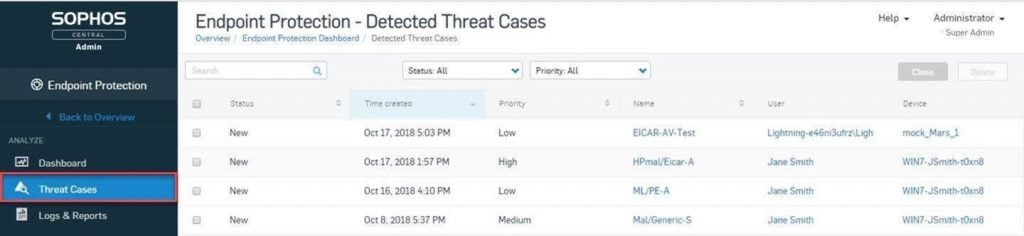
Sophos Threat Cases make Intercept X Advanced with EDR truly stand out from the crowd as an end user protection platform. Granting admins the ability to investigate and clear up malware attacks with just a few clicks, Threat Cases provide a birds’ eye view allowing you to visualize incidents occurring on your network. After getting an idea of what the incident looks like, you can then drill down into individual events and files to investigate details at a granular level. Guided response, root cause analysis, and attack visualization make Threat Cases a one-of-a-kind experience for network administrators.

See where attacks originated, how and where they spread, and identify which files, processes, applications, and devices were affected by the breach. Threat Cases are available for both XG firewalls and for servers, offering extensive visibility and control both on-premise and in the cloud.

Quickly identify, diagnose, & mediate

    • Isolate affected devices
    • Search for similar threats
    • Clean up after a breach
    • Block threats with automated guided response

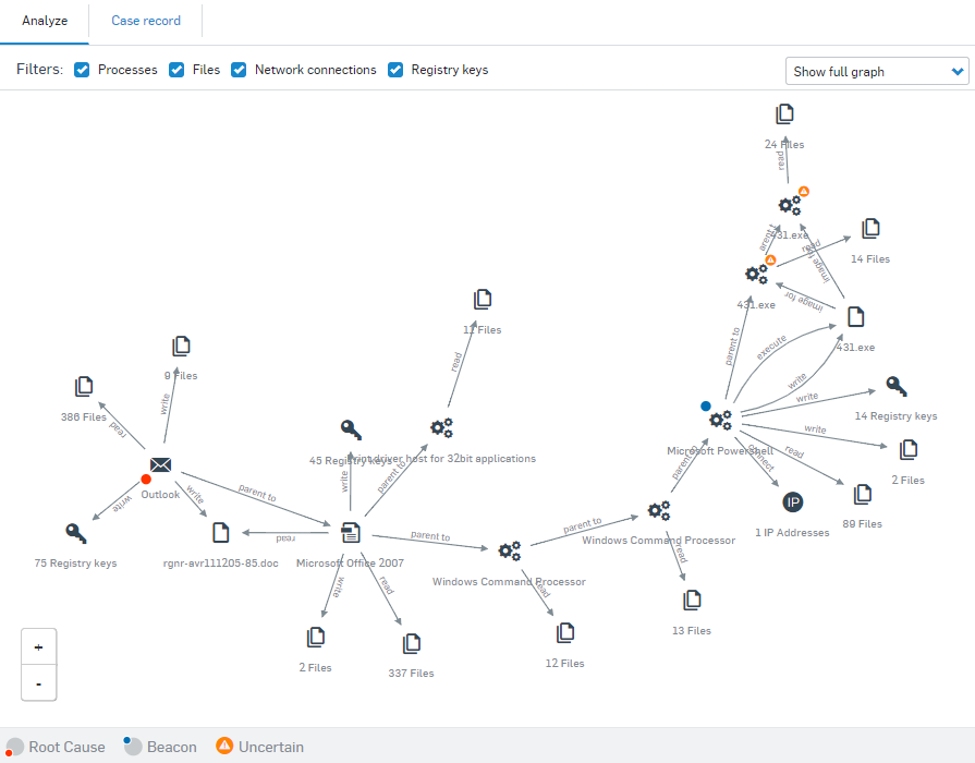
For example, if malicious behavior is detected in an Office 365 file such as a Word document or Excel spreadsheet, Sophos Threat Cases will indicate that the file was written to the computer by Outlook.exe and tip off administrators that the threat was the result of a malicious email. Admins may then use this information to identify and close security gaps to prevent future exploitation of this attack vector.

Threat cases are only generated for malicious behavior detections and do not include detection of Potential Unwanted Applications and other false positives.

Types of infections seen by Sophos Threat Cases:

    • Malware detection
    • Web threats
    • Malicious behavior
    • Malicious traffic
    • Exploits

Where to find Sophos Threat Cases

If you want to take advantage of the features offered by Sophos Threat Cases such as root cause analysis, registry key and process filters, infection path visualization, and guided response, you’ll need an Intercept X Advanced license to get started. Once logged into your Sophos Central Admin dashboard, Sophos Threat Cases can be found by clicking the “Endpoint Protection” or “Server Protection” menu linked in the “My Products” section.

Sophos Threat Cases is found in the Sophos Central admin dashboard

The Anatomy of a Threat Case

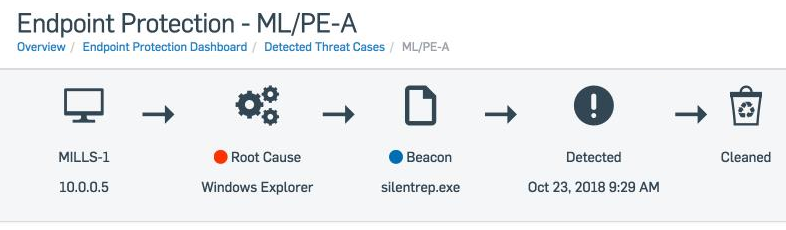
What does a threat case event look like and why is it so helpful for network administrators? Every Threat Case begins with a simplified events chain, giving an easy-to-follow visualization of the basic details of your incident.

Simplified Attack Chain makes it easy to visualize a breach

After the simplified attack chain, each Sophos Threat Case serves up a more robust attack summary that details basic information like detection name, root cause, potentially affected data, infected user, device names, and attack timeframe.

The summary section is followed up by a Suggested Next Steps function which generates automated remediation advice on what to do next. Advice is dependent on the type of attack and other details specific to the incident. Examples of some advice from Sophos Threat Cases include isolating computers, setting priorities, and setting the status of a case record.

Last but definitely not least, the Analyze section is home to most of the detailed information admins will love from Sophos Threat Cases. Here you can find graphics of the attack “beacons” that Sophos detected and the root cause that Threat Cases identified. The beacon and root cause are then linked by interconnecting lines that make up the attack chain.

Sophos Threat Cases Analysis Section

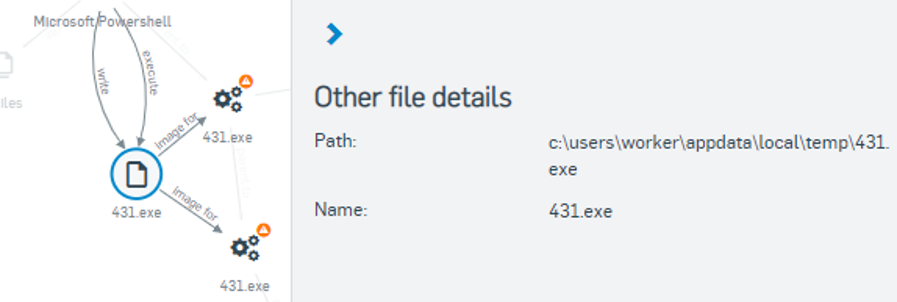
Admins can click on any individual event in this attack chain graphic, allowing them to view additional detailed information in a right-hand pop-up menu.

Sophos Threat Cases detail overviw

Try Sophos Intercept X and Sophos XG Firewall

Ready to get your hands on Threat Cases but still not sure about Sophos security? Try a 30-day trial of Intercept X or a 30-day trial of Sophos XG Firewall for free before you buy. You can also get your next Sophos XG Firewall appliance at no cost when you purchase a qualifying 3-year security license with our Sophos Evolved Firewall Promo.


← Older posts Newer posts →