What is a Man in the Middle attack? How to keep your online footsteps hidden

Today we’re going to talk about a ghost in the machine. But don’t get all Gilbert Ryle’d up. We’re not waxing philosophic or discussing Scar Jo movies. No, we’re going to demask that phony bogeyman playing trapeze among your unsecured wires: the Man in the Middle. For those unfamiliar with the term, a Man in the Middle (MITM) breach is a cyber-attack in which the bad guys park themselves between you and the web. Man in the Middle is one of the many common attacks discussed in our Spooky Cyber Threats episode of Ping: A Firewalls.com Podcast, and today we’ll give a more in-depth picture of what the threat looks like.

What is the goal of a Man in the Middle attack?

The objective is simple: gather as much personal data about the victim as possible. If an opening presents itself, cyber criminals will pursue it. This means that if attackers can trick you into revealing or changing your login credentials, they will. If they can swipe your financial data, they will. The Man in the Middle attack is primarily a recon job with an opportunistic slant.

How does a Man in the Middle attack work?

Let’s simplify your web surfing to an easily-digested scenario: your computer, Point A, wants to fetch data from a web server, Point B. Point A requests data, the request travels over the web, and the web server receives the request. The web server gathers the data and ships it back to Point A. Man in the Middle attacks occur when a cyber attacker plants a toolkit between Point A and Point B and acts as a stepping stone between the two.

From this position, the Man in the Middle employs keyloggers, social engineering, and monitoring tools to either abscond with personal data or attempt to manipulate the user at Point A into further jeopardy. This can mean anything from serving fake versions of requested websites, tricking users with bogus password change requests, or tricking your contacts into providing sensitive information through phishing.

While old-school Man in the Middle attacks required attackers to literally plug into your network via close physical proximity, savvy cyber criminals have perfected the technique to take place completely through your browser. No longer do criminals need to crawl through the ventilation system to smuggle a bug onto your mainframe. Now they can do it all from the comfort of home.

How do you prevent Man in the Middle attacks?

1 – Firewalls & Configuration

The most powerful tool you have in the war for cyber security is the firewall. However, an appliance alone is rarely sufficient. It is important to also ensure that your firewall hardware is configured correctly. Think about it, if you buy a fancy home security system, you’re not just going to plug it into an outlet and call it a day. Instead, your security devices should be fine-tuned to fit the needs of your network.

Take your blind spots and unique vulnerabilities into account. No two networks are built the same and so no two firewalls should be configured the same. Ensuring that you have a suitable setup from the start will save a lot of pain down the road.

2 – Comprehensive Endpoint Protection

Even the most expensive hardware will fail once an unsuspecting employee opens a malicious file. Building a tall fence is great and all, but without strong security at the gates, you’re just redirecting network raiders to specific doorways. Sandboxing, ransomware damage rollback, antivirus clients, and browser protection are all fantastic options to add on to your security infrastructure.

Sophos Intercept X is a powerful security suite built to run alongside your current applications. Give it a two week trial for free to see if it works with your network.

3 – Exercise Safe Web Practices

This is the part of the article that preaches about strong passwords and email attachments. So, here goes:

– Use strong, complicated passwords. Never use default credentials like “admin” or “1234”

– If you’re asked to follow a link in an email, always type the URL into your browser. Don’t click! Spoofed domains, typo-squatting, and crucial differences between HTTP and HTTPS mean that every href you click is a potential malware minefield

– Don’t open suspicious attachments from unknown senders

– Avoid public Wi-Fi if possible. If you must connect to a public router, do so indirectly through Virtual Private Networks. Public networks are a watering hole where hungry cyber crocodiles are just waiting for their prey to exhibit vulnerability

Following cyber security best practices and deploying next-generation firewalls with an endpoint solution mean instead of dealing with a Man in the Middle, you’ll more likely be playing monkey in the middle with desperate cyber criminals trying, and failing, to get their hands on your data.

Learn about more cyber threats

Now that you’ve mastered the Man in the Middle, maybe it’s time to conquer keyloggers, trounce trojans, or make persistent threats perish. Check out the Firewalls.com Threat Dictionary to learn about all of the latest network security threats.

Prefer to listen and learn? Check out Episode 5 of Ping: A Firewalls.com Podcast where we talk cyber threats with SonicWall’s Daniel Kremers and Fortinet’s Douglas Santos.


Originally published by Andrew Harmon on LinkedIn Pulse, October 2017


Spooky Cyber Threats – Ping: A Firewalls.com Podcast Episode 5

Episode 5: Spooky Cyber Threats, A Roundtable

Halloween is fast approaching and that means things that go bump in the night are top of mind for many. Unfortunately in the cyber world, there is no shortage of scares. For Episode 5 of Ping: A Firewalls.com Podcast, we  tackle these online terrors head-on, with the help of experts from two top security companies. Kevin and Andrew welcome Douglas Santos, Security Strategist with FortiGuard Labs and Daniel Kremers, Sales Engineer with SonicWall as they discuss cyber threats like ransomware, fileless malware, DDoS (distributed denial of service) attacks, zero-day exploits, IoT (Internet of Things) vulnerabilities, and much more. In this roundtable discussion, we also find out what cyber hazards they find most scary and get some tips on protecting yourself and your organization against the bad guys.

You can learn more about threat monitoring by SonicWall Capture Labs and FortiGuard Labs, and get educated on the latest cyber terminology at our very own Threat Dictionary.

Also in this episode, Firewalls.com Network Engineer Alan Steady stops by for our Engineer’s Minute with some easy to implement tips that’ll better protect you against cyber threats. Learn more about the network security services our certified engineers offer.

And in our Headlines segment, you’ll hear about how much cyber attacks are costing small businesses, a key factor many neglect when it comes to cybersecurity, and how Americans did on a recent cybersecurity quiz (and play along with the podcast to take the quiz yourself).

How to listen

Listen to Ping – A Firewalls.com Podcast using the player above…

Or just about anywhere you prefer to listen to podcasts (Apple Podcasts, Spotify, Google Podcasts, Stitcher, Overcast, TuneIn, iHeart, Pocket Cast, Castro, Castbox, Podchaser, YouTube, and of course via RSS, to name a few). Remember to subscribe or follow where you can to get the latest episodes as soon as they’re released, and rate and review us as well!
I know the basic button code you gave me awhile back was pretty basic – like no color or font adj

Missed our previous episodes? Get Episode 4 here, Episode 3 here, Episode 2 here, and check out episode 1 here (or again, on any of your favorite podcasting platforms).

New episodes are released every other Wednesday. Have a special request for a topic or a question for our network engineers to address? Email us at podcast@firewalls.com and it could be on our next show!


Secure Wi-Fi & Wi-Fi Cloud – WatchGuard Wireless

Why Secure Wi-Fi

Wireless networks are a necessity in the 2019 business world – but opening up your organization’s airwaves can bring with it some unwelcome visitors. That’s why security needs to be a top consideration when setting up your WiFi. WatchGuard can help with Secure Wi-Fi. Secure Wi-Fi includes a variety of services – like a Wireless Intrusion Prevention System (WIPS), access control, and excellent visibility into your wireless network’s activities – which – combined with WatchGuard access points – help ensure your business has a Trusted Wireless Environment.

A Secure Wi-Fi license also means you have access to WatchGuard’s Wi-Fi Cloud, which is where you can easily deploy your APs and manage your network (or networks) from wherever it’s most convenient to you. The Wi-Fi Cloud lets you customize your dashboard to get the network information most important to you as soon as you open it. And that setup and deployment? You can just open the GO Mobile Web App from your smartphone, tablet, or computer – whatever device you’d prefer.

Learn more about Secure Wi-Fi and the Wi-Fi Cloud in our video:

How to Get Secure

A Secure Wi-Fi – or an even better Total Wi-Fi – license is available with the purchase of a WatchGuard AP. Browse the full line of access points from WatchGuard to find the ones that fit your network needs best.

Shop WatchGuard Wireless Access Points


WatchGuard Wave 2 Wireless Access Points Merge Security & Speed

The Next Wave

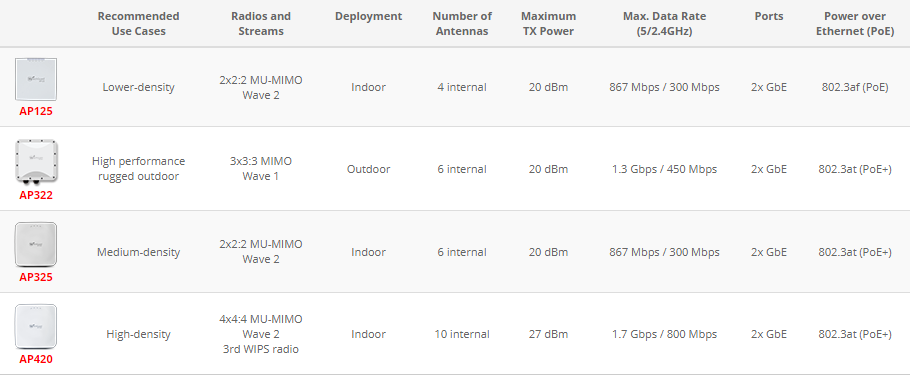
WatchGuard released a new set of wireless access points in 2019–the AP125, AP325, and AP420–that integrate with the WatchGuard Wi-Fi Cloud management platform. With sweet new features like Wave 2 capabilities, MU-MIMO dual radios, and a Wireless Intrusion Prevention System, there’s some big news packed into these small boxes.

Check out the table below to see if the WatchGuard AP125, AP325, or AP420 make the most sense for your wireless needs.

What makes these new wireless access points unique? Keep reading and we’ll answer all of your questions about the factors that set the WatchGuard AP125, WatchGuard AP325, and WatchGuard AP420 apart from the crowd.

What is Wave 2?

Wave 2 is an evolution of traditional 802.11 wireless protocols. Think of Wave 2 as the next generation of wireless connectivity. This development utilizes Multiple-User, Multiple-Input, Multiple-Output (MU-MIMO) technology to increase the connectivity and data transfer speeds of wireless APs. MU-MIMO was designed to make it easy for multiple users to connect to a wireless network at the same time, rather than “queuing” in a first-come, first-serve method. A handful of other new advancements introduced with Wave 2 focus on increasing maximum wireless speeds.

What is WIPS?

WatchGuard boasts one of the top Wireless Intrusion Prevention Systems (WIPS) for wireless access points in the industry and it’s easy to see the value. WIPS is super accurate when detecting and identifying access points and client devices to intelligently prevent intrusions from the latest Wi-Fi threats. WIPS prevents six known categories of Wi-Fi threats without noticeably impacting performance, which means your wireless environment is safe from man-in-the-middle attacks, honeypots, “evil twin” attacks, rogue APs, rogue clients, and more. Every WatchGuard access point is able to operate as both an access point and a dedicated intrusion prevention sensor – and WIPS even works with existing non-WatchGuard access points.

WatchGuard AP420’s Dedicated 3rd 2×2 MIMO Dual Band Radio

The largest of WatchGuard’s new line of access points, the AP420, is designed for heavy-duty connectivity in high-density environments. To lessen the impact of security processes with a high-volume of users connecting simultaneously, WatchGuard off-loads scanning and security processes to a dedicated third radio.

The WatchGuard AP420’s 2×2 MIMO dual-band radio ensures that all of the advanced wireless threat protection offered by WIPS runs without affecting speeds for the many users that these access points serve. Even under heavy demand, your organization can trust that advanced security is just as much a priority as speed and ease-of-use.

Cloud-Based Management

Great news for the IT team: WatchGuard’s secure cloud-based access points feature an entirely controller-free management experience, so wireless network administrators can say goodbye to the limitations of complex controller infrastructure. WatchGuard Wi-Fi Cloud environments can scale from a single AP up to an unlimited number spanning multiple locations.

Security policies are easily configured for grouped APs, meaning you can easily set rules for specific floors of a building, certain user groups, or entire buildings. All of this is managed through an intuitive web-based dashboard.

Integrating with Google for Education

WatchGuard access points are especially great solutions for K-12 classrooms because they integrate easily with Google for Education services. Google for Education is a collection of applications and other web services that provides customizable versions of popular Google products like Gmail, G-Drive, Slides, Sheets, Docs, and more. With these convenient tools, teachers are able to create virtual classrooms and projects from scratch. Google for Education makes it easier than ever for teachers to connect with students through Chromebooks, tablets, and the cloud, bringing technology to the classroom. Best of all, Google for Education is free for schools to use!

With WatchGuard’s Wave 2 wireless access points, only devices that are registered to a school’s Google domain can connect to the wireless network where network access policies are enforced. This integration brings granular control and ease-of-use to school districts looking to deploy Google for Education.

Learn more about the full line of WatchGuard access points, and shop for the models that are right for your network.

Shop WatchGuard Wireless Access Points


What Are Sophos TotalProtect & TotalProtect Plus for XG Firewall?

If you’re looking into deploying a Sophos XG Firewall on your business network, it can be a challenge to discern the precise differences between various bundles, services, and licenses. What exactly is included in a Sophos TotalProtect or TotalProtect Plus bundle? How does it differ from FullGuard or EnterpriseProtect? While we took an in-depth look at Sophos EnterpriseProtect & EnterpriseProtect Plus suites in past posts, we’re back to peek again into the Sophos arsenal. This post will layout exactly which services are included in TotalProtect & TotalProtect Plus bundles for XG Firewall, showcasing the most comprehensive security solutions Sophos offers as part of its Synchronized Security suite.

Blog Banner General Buy Now Red-High-Quality

XG Firewall Base Appliance

We talked extensively about the capabilities of Sophos XG Firewalls in our most recent podcast with Chris McCormack, (Sophos Senior Product Marketing Manager). XG Firewalls range in size from 1-10 user setups to 1000+ user environments, bringing advanced scanning and security capabilities to SMBs and enterprises alike. TotalProtect and TotalProtect Plus bundles include both a physical XG Firewall appliance–like the recently launched XG 86 & XG 106 firewalls–and the full suite of security services. FullGuard and FullGuard Plus consist of the attached security services, but do not include an appliance.

Network Protection

Sophos Network Protection licenses tie in the Sophos Intrusion Prevention Service, Advanced Threat Protection, and the Sophos Security Heartbeat, providing your network with robust perimeter defenses designed to keep zero-days at bay.

Email Protection

Sophos Email Protection scans inbound and outbound inbox traffic and fully supports SMTP, POP3, & IMAP protocols. Spam greylisting and a robust reputation service keep your inboxes free of unwanted junk while real-time security lookups in the cloud test message contents against the latest email threat intelligence. With plenty of automated file-type detection, phishing detection, and malware detection engines running simultaneously, the threat of Business Email Compromise is minimized. Additionally, pre-packaged Content Control Lists make for convenient one-click compliance for PII, PCI, HIPAA, and many other regulatory requirements.

Web Protection

With a majority of Internet traffic now encrypted, managing inbound and outbound web traffic is crucial to keeping threats off your internal network while protecting and prioritizing your limited bandwidth resources. Sophos Web Protection provides real-time visibility and control, enhanced web filtering, huge databases of pre-built URL blacklist, Smart Filters, and continuous threat intelligence updates from SophosLabs.

Blog Banner General Buy Now Red-High-Quality

Web Server Protection

Sophos Web Server Protection guards your externally-facing servers and applications, shoring up one of your most publicly-exposed attack surfaces. If you host your own website, Web Server Protection offers a reverse proxy and web application firewall, along with SSL offloading and authentication services, to prevent data loss. This is a super easy way to harden your servers against attack while improving server performance.

Enhanced Support

Sophos Enhanced Support provides a warranty and replacement option for your firewall should it experience a malfunction. Your network is also backed by 24×7 Sophos support via phone, email, or a web portal ticket system. When new firmware updates become available, Enhanced Support ensures your XG Firewall is updated in a timely manner – a security must.

Why Bundle Sophos Services?

Some administrators may think that it saves time, money, or labor hours if they purchase individual security licenses “a la carte” as needed, but in most cases this is incorrect. Manufacturers bundle comprehensive service suites not because they hope to sell more services, but because these bundles have been holistically designed to integrate with one another and provide far greater visibility, control, and ease-of-use when working in tandem than when working individually. In the case of Sophos TotalProtect & TotalProtect Plus bundles, the whole is even better than the sum of its parts. When your system is composed of like-minded team players, it enables real-time communication between network layers. This means your security infrastructure is covered from multiple angles and is more responsive in the case of a breach.

You can learn more about XG Firewalls and the intelligent Sophos services that operate on them by checking out our latest episode of Ping: the Firewalls.com Podcast.


← Older posts Newer posts →