To celebrate the holiday season, Ping: A Firewalls.com Podcast presents its first ever podcast play – a sure-to-be new classic that weaves a cautionary cybersecurity Christmas tale centered around a penny-pinching small business owner on Christmas Eve. Kevin and Andrew flex their voice-acting chops as they bring this not-at-all familiar story to life, featuring special appearances by frequent podcast topics like phishing emails, ransomware, threat intelligence, and more.
The Christmas spirit is also strong with our Network Engineer Nick Petriko, who has been checking his network security Naughty & Nice list in our Engineer’s Minute. There’s still time to get on the Nice list! Check out all of the expert security services our certified engineers offer.
In our Headlines, we discuss a major U.S. city dealing with ransomware, a twisty story about cryptocurrency that may involve a faked death, and yet another IoT device with security vulnerabilities – though these were thankfully patched.
How to listen
Listen to Ping – A Firewalls.com Podcast using the player above…
Missed our previous episodes? You can get them anywhere you listen to podcasts, or go to our full episode list.
New episodes are released every other Wednesday. Have a special request for a topic or a question for our network engineers to address? Email us at podcast@firewalls.com and it could be on our next show!
The plans have been drawn. The furniture has been ordered. The staff has been hired. That new office is coming together nicely. But you know there’s still a missing piece – a secure network to ensure your new office is connected. But where do you begin?
Don’t fret. We’ve put together a quick video outlining four things you should know about your desired network setup before you start your shop for a firewall – and other solutions like wireless access points, network switches, etc. You probably know this stuff already, but it helps to compile all this background information, so that you’ll know which devices are right for your particular network needs. Watch on for the info:
So whether you’re a small business owner taking that next big step or a branch manager tasked with getting things up and running at a new location – getting these information ducks in a row will help you focus on the right products for your network needs and ensure you don’t have to go back to the drawing board after hastily picking the wrong ones. Plan out your user numbers, raw connection speed, remote access needs, and desired wireless capabilities and you’ll be ready for the next step.
The Next Step
Now that you’ve gathered the needed information, it’s time to shop for your network solutions. Visit Firewalls.com and start with the Firewall tool at the top of the homepage. Plug in your user count, and you’ll be off and running. And what’s even easier? Talking to a network security expert who can walk you through your options and work with you to put together a bundle that addresses all your needs at once. Give one of our experts a call at 866-403-5305 or email sales@firewalls.com. If you’d still like to do a bit more research before you shop, check out our Navigating Network Security episode of Ping: A Firewalls.com Podcast (available wherever you listen) for more detailed tips on the process. And if you need help deciphering datasheets, read through our blog post on that very subject. Your secure SMB network will be up and running before you know it!
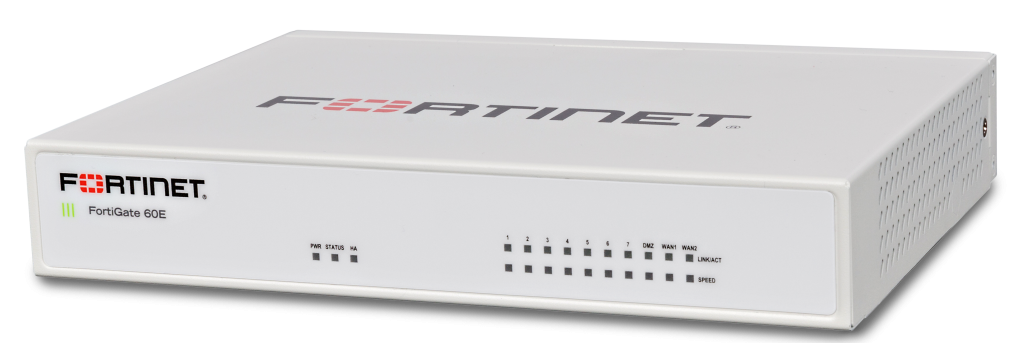
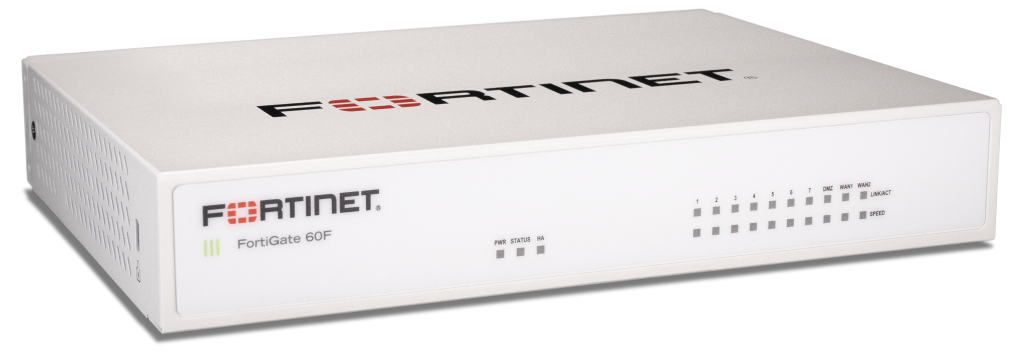
The FortiGate 60F arrived just last month and the network security community is already abuzz with praise for this high-tech security appliance. With its SoC4 security processor, application-specific chip set, and WAN edge capabilities, there’s a lot to get excited for. However, because firewall manufacturers tend to design and launch firewalls in successive series, there can be a bit of confusion when it comes to understanding the key differences between the FortiGate 60F and it’s predecessor, the FortiGate 60E. While the FG-60E is still one of the fastest and most secure (and most popular) firewalls in the industry, let us take a closer look at what new potential the FG-60F has in store.
FortiGate 60E Tech Specs at a Glance
Firewall Throughput: 3 Gbps
IPS Throughput: 400 Mbps
NGFW Throughput: 250 Mbps
SSL VPN Throughput: 150 Mbps
Concurrent Sessions (TCP): 1,300,000
New Connections per Second: 30,000
Firewall Latency: 3 μs
FortiGate 60E Overview
The FortiGate 60E is one of the most secure Next Generation Firewalls ever designed, propelled by tons of industry awards and accolades. In fact, the FortiGate 60 series is the #1 selling firewall in the world with over 1.5 million units sold globally. Originally hitting the market in 2016, the FortiGate 60E includes a SoC3 (System-on-a-Chip) architecture that further accelerates networking performance well past the potential of previous generations. The FortiGate 60E was among the first Fortinet firewalls to be integrated into the then-emerging Fortinet Security Fabric infrastructure.
The FortiGate 60E is a Unified Threat Management (UTM) platform that delivers integrate wired and wireless networking for medium-sized organizations. This model includes built-in dual-band, dual-stream wireless with integrated internal antennas providing fast 802.11ac wireless. Further, a USB port located on the rear of the appliance allows for compatibility with 3G or 4G USB modems for additional WAN connectivity.
Though this Next Generation Firewall is a few years old, it continues to stand at the front of the pack when compared to its competitors. For any small business not particularly concerned with SD-WAN considerations, the FortiGate 60E still makes for an excellent option as a primary network firewall.
FortiGate 60F Tech Specs at a Glance
Firewall Throughput: 10 Gbps
IPS Throughput: 1.4 Gbps
NGFW Throughput: 1 Gbps
SSL VPN Throughput: 900 Mbps
Concurrent Sessions (TCP): 700,000
New Connections per Second: 35,000
Firewall Latency: 4 μs
FortiGate 60F Overview
The FortiGate 60F is a high-performance SD-WAN solution in a compact fanless form factor. Designed for branch offices, remote outposts, and mid-sized businesses, the FG-60F simplifies remote access issues and helps organizations reduce long-term expenses by phasing out expensive MPLS connections. SD-WAN provides secure, direct Internet access for the kinds of cloud-connected applications that businesses now depend on like Dropbox, GitHub, Salesforce, Office 365, and more.
This security-focused WAN edge networking is made possible by Fortinet’s SD-WAN Application-Specific Integrated Circuit (ASIC). The first-of-its-kind SOC4 – first introduced in the more port-heavy, rack-mountable FortiGate 100F – delivers blazing fast application identification and steering for over 5,000 known cloud applications. Fortinet’s advanced routing capabilities mean that modern connected businesses achieve superb user experience without worrying about performance loss.
The FortiGate 60F joins its F-Series big brother the 100F as kings of the growing SD-WAN arms race and the industry’s news face of digital transformation. For any organization looking to deploy applications, devices, or cloud environments across multiple branch locations, the WAN edge efficiency of these models are just too great put them at the top of the shortlist.
Curious what all the hubbub about SD-WAN is about? Fortinet’s Cyber Threat Assessment Program allows you to test these new technologies in a real-world setting: your network! Get your hands on a free SD-WAN test drive and see how much time, money, and productivity your network is leaving on the table. Sign up for a free Cyber Threat Assessment today.
When you’re setting up a new office, there’s a lot to consider. How many desks do I need? What kind of coffeemaker should I get? Where do I find staff? Setting up a secure, reliable network should be near the top of your list. Business requires a network that maximizes internet service and optimizes connectivity. As a small business owner – or anyone else tasked with setting up a network – you know you need equipment and security services, but may not feel comfortable navigating the labyrinth of options on the network security market. That’s where we extend a helping hand! On Episode 6 of Ping: A Firewalls.com Podcast, Andrew and Kevin welcome Anthony Mercho, Firewalls.com’s Director of Sales, to shed light on the initial questions you’ll need to answer to make the best long-term investments for your network. We talk user counts, connection speeds, network switches, wireless APs, and much more.
To reach Anthony’s team of experts for a one-on-one discussion of your needs, call 866-403-5305 or instantly connect via live chat when you visit Firewalls.com. You can also follow the Firewalls.com Blog for everything network security related. Looking for information on specific brands? Check out our Buyers Guide series.
Also in this episode, our Network Engineer Nick Petriko pitches in with an Engineer’s Minute that reminds you about one of the first things you should do when your new firewall arrives. Check out all of the expert security services our certified engineers offer.
And in our Headlines segment, you’ll hear why in an age of zero-days, phishing and other simple attack types may still be most likely to cost you, risks that Internet of Things (IoT) devices pose even when not on your network, and about a recent cyber attack on a nuclear facility that likely won’t give you warm fuzzies.
How to listen
Listen to Ping – A Firewalls.com Podcast using the player above…
New episodes are released every other Wednesday. Have a special request for a topic or a question for our network engineers to address? Email us at podcast@firewalls.com and it could be on our next show!
The modern threat landscape has many pitfalls. The best way to set yourself up to successfully negotiate this hazardous terrain is with the proper armor. What is the right armor? Knowledge. Personal knowledge of the types of threats that exist. Organizational knowledge of how to behave online. And the knowledge of dedicated threat intelligence experts that goes into the security solutions offered by top network security providers. Companies like SonicWall, Fortinet, and Sophos have teams of security analysts keeping tabs on the threat landscape 24/7/365. They incorporate this knowledge with artificial intelligence and machine learning to offer the most comprehensive protection possible against the latest threats.
In our latest video, we take a closer look at the threat landscape, what you can do to arm yourself, and what these companies are doing to fortify that armor. Watch below:
Thirsty for more?
If you finished that video yearning for even more threat intelligence, read through the Firewalls.com Threat Dictionary to get an A to Z guide through the current landscape.
To complete your multimedia quest for threat knowledge, we also offer an audio option. Listen to Episode 5 of Ping: A Firewalls.com Podcast in which we talk cyber threats with two experts in the field, SonicWall’s Daniel Kremers and Fortinet’s Douglas Santos.