Episode 33: Black Friday Becomes Cyber November 2020
Holiday shopping deals are already coming from all directions. That’s because Black Friday is no longer just one day of deals, it’s turned into Cyber November. On the latest Ping Podcast, Kevin and Andrew welcome Dan Lohrmann, who explains why online retailers are spreading out the sales in 2020. Hint: As with just about everything else this year, it relates to COVID-19. Dan also offers tips to new and seasoned online shoppers alike to avoid common pitfalls. On top of that, we get into some election 2020 cybersecurity talk. And finally, we wonder whether the new normal in 2020 is permanent.
Read Dan’s blog for more on this unusual Black Friday holiday shopping season.
Our Ransomware Reckoning segment tells a somewhat positive story of Japanese video game maker Capcom’s response to an attack.
In headlines, hear why tax pros need to take cybersecurity seriously. Following that, we talk about the costs for breaches in the financial sector. Finally, if this year’s terrestrial issues aren’t enough for you, learn why you should worry about cybersecurity in space!
How to listen
Listen to Ping – A Firewalls.com Podcast using the player above…
Missed our previous episodes? You can get them anywhere you listen to podcasts, or go to our full episode list.
Learn even more about network security through our blog, which features new content every week.
New episodes are usually released every other Wednesday. Have a special request for a topic or a question for our network engineers to address? Email us at podcast@firewalls.com and it could be on our next show. Thanks in advance for any listens, follows, subscribes, reviews, comments, shares, and generally spreading the word!
The best network switches make life easier for an IT team. Though network security can be maddeningly complicated, network switches ease the complexity. By connecting multiple devices across your network, switches allow secure data sharing over multiple appliances and endpoints.
Powerful centralized management lets administrators deep dive into network issues, deploy unified policies, and manage hundreds of sites through a single dashboard. Network switches are a bridge between devices, using MAC addresses to forward data through layer 2. In sum, they play a vital role in modern Local Area Network (LAN) deployments.
What is a Network Switch?
A secure network switch integrates all the devices on your network, allowing for seamless sharing and data transfer between them. This can include everything from firewalls and wireless access points to VoIP phones, printers, servers, and more. Further, these devices can be monitored and controlled through a centralized management platform, allowing admins to quickly and easily shift resources across the network to safeguard productivity for business-critical applications and services.
Network switches are integral parts of a complex network, providing a wired or virtual connection to desktop computers, IoT devices, and more. For starters, every switch includes a set number of Ethernet ports which support a varying number of connected devices. On top of that, you can “stack” switches in a series, allowing your business to scale up and connect larger numbers of devices and users to the LAN.
What to Look for in a Network Switch
Network switches can be complicated, but they are necessary for seamless end-to-end network security and performance. Before deciding which network switch is best for any business, consider a few questions:
How many users are operating on the network? This user count includes all Internet-connected devices
How will the switch receive power? Power-over-Ethernet options make certain switches more appealing for complex deployments
What is the business’ Internet speed and how much is used? Multi-gigabit switches will help in utilizing the full ISP speeds
Superior network transparency with granular visibility at the app & hostname level
Zero-touch provisioning allows for rapid deployment across the network
Packet capture & other remote diagnostic tools help troubleshoot network errors
What Makes Cisco Meraki MS Series Switches One of the Best Network Switches in 2020?
Cisco Meraki MS Switches are purpose-built for intuitive management and ease-of-use. Cisco Meraki network switches do not require a Command-Line Interface to manage ports or change configurations. As a result, network administrators get access to a centralized management platform with granular visibility and control by just plugging it in. On top of that, a simple dashboard helps admins sort through information and track events with a detailed change and event log.
Cisco Meraki switches allow “virtual stacking.” In other words, switch port configuration changes can be made on the dashboard without the need to install and deploy additional on-premise switches. Therefore, you can start on-prem, then build up into the cloud!
Fortinet network switches support wire-speed switching protocols in addition to Store & Forward mode. On top of that, the FortiSwitch appliance is ideal for a SD-Branch deployment, further enabling businesses of any size to enjoy the benefits of digital transformation.
Ability to roll out devices across the network quickly & securely
Prioritize network traffic for superb Quality of Service for business-critical apps
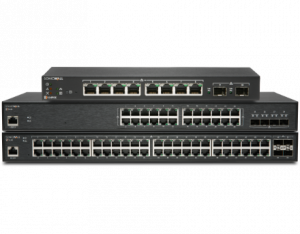
What Makes SonicWall Switch One of the Best Network Switches in 2020?
When paired with a firewall, SonicWall Switches deliver end-to-end security that simplifies management and network troubleshooting. This tightly-knit security posture eliminates blind spots and gaps. In turn, it helps network administrators locate and eliminate weak points in their security infrastructure.
SonicWall Switches are flexible, high-performance networking appliances that provide high port density and Power-over-Ethernet capabilities. Additionally, they offer multi-gigabit performance at prices affordable even for small businesses.
But wait, there’s more…
Looking for the best protection for your small business?
Give us a call at 866-957-2975 to find the perfect fit!
Shopping for email security, endpoint, wireless access, or ransomware protection? Then you should check these out, too:
Setting up wifi is a business imperative in 2020, and that means finding the best wireless access points is, too. The days of wireless networking being an option are long gone. But how do you go from knowing you need wifi to making it happen? What are the best options for getting your unique needs addressed and your network up and running? Why are we asking so many questions? Read on for the answers, and for the best wireless access points of 2020…
What does a wireless access point do?
A wireless access point in essence creates your wireless network. With it, you’re connecting to a hard-wired router, network switch, or other hub. In many business settings, that means not only offering access to the internet, but also to your workplace network, including its applications, files, etcetera. With the right wireless access point, you get built-in security and the ability to add separate guest wifi.
Which is better, wifi extender or access point?
A wireless access point is better than a wifi extender when it comes to performance and configuration capabilities. While extenders are normally less expensive, you get what you pay for. An extender replicates an existing network transmitted from a router, and extends its reach. However, the quality of the connection degrades. A wireless access point creates its own network, ensuring top notch performance for those in range. And you can manage and configure access points to your needs.
How do I choose a wireless access point?
Choosing a wireless access point comes down to which factors are most important to you. Access points come with a variety of radio and bandwidth options that affect performance. So it’s important to consider how many users will need access simultaneously and your connection speed.
Also, consider your space – as in walls that could hamper signal strength, wiring to power the devices (PoE options are available), and how you’ll mount the devices (wall, ceiling, indoor/outdoor). While some deployment scenarios only require one access point, many often need multiple APs to ensure quality connectivity.
Security and management are additional factors. Each manufacturer offers its own management platform to gain visibility into your network and configure it to your needs. And built-in security options vary. Let’s dive into the best wireless access points of 2020.
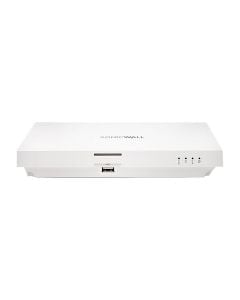
What makes SonicWall SonicWave 231c one of the best wireless access points of 2020?
SonicWaves are the latest and greatest wireless access points from SonicWall. They offer Wave 2 wifi performance, allowing for more users with less lag. On top of that, the SonicWave 231c and its siblings integrates with the robust security of SonicWall NGFWs. That security extends to the AP itself, too, with a dedicated third radio focused on security. Plus, even if you don’t have a SonicWall firewall, it comes equipped with advanced security services like the Capture ATP sandbox on its own. In addition, you can manage the SonicWave through your SonicWall firewall, or with SonicWall’s WiFi Cloud Manager – an intuitive, cloud-based WiFi network management system ideal for networks of any size.
What makes WatchGuard AP225W one of the best wireless access points of 2020?
The AP225W also features Wave 2 wireless. Plus, it combines that performance with the security of one of the Wireless Intrusion Prevention Systems (WIPS) out there. The WIPS detects and IDs access points and client devices to intelligently prevent six known categories of Wi-Fi threats. The best part? It does this without noticeably impacting performance. And another best part? security scanning and enforcement continues even if your connection is interrupted. On top of that, you get access to WatchGuard’s Wi-Fi Cloud management. This provides visibility, troubleshooting, and configuration capabilities in one place. Plus, it makes setup a snap. You can get your AP225W up and running in less than two minutes after connecting to the cloud. And as for deployment, its PoE+ capabilities make it simple to connect and turn on with one cord – whether you choose a wall or ceiling.
What makes Fortinet FortiAP 431F one of the best wireless access points of 2020?
The FortiAP 431F, along with its siblings in the newly created F-series (the 433F and 231F) are the newest access points on this list. That newness also means the latest in wireless performance, with 802.11ax – better known as WiFi 6. WiFi 6 access points are faster and have more capacity than previous generations. And with the FortiAP 431F, you’re getting a top of the line device. It features four radios, five internal antennas (or antennae), and 24/7 scanning across both wireless bands while still providing access on both the 2.4 and 5 GHz bands. You also have the flexibility of Power over Ethernet and wall or ceiling deployment options. Fortinet keeps security top of mind as well, with built-in wireless security, integration into the Fortinet Security Fabric, and management either through your FortiGate firewall or the FortiAP Cloud provisioning and management portal.
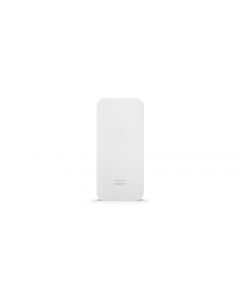
What makes Cisco Meraki MR70 one of the best wireless access points of 2020?
We couldn’t make a top wireless access points list without including an outdoor option. And Cisco Meraki’s MR70 does just that, providing enterprise-grade security and simple management
in a ruggedized, IP67-rated form factor which protects it from the elements. Just as with our other best-ofs, Meraki doesn’t skimp on security. The MR70 boasts Air Marshal, a built-in WIPS for threat detection and remediation. Plus, it’s managed through the Meraki cloud, which monitors your AP around the clock and ensures you always get the latest firmware updates as soon as they’re out – protecting you from any emerging issues. It also makes setup a snap, with self-configuring, rapid plug-and-play deployment. The physical device has internal antennas, PoE, and plenty of Wave 2 connectivity juice, too.
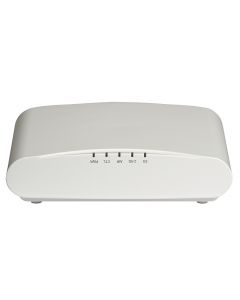
What makes Ruckus Unleashed R610 one of the best wireless access points of 2020?
For our final entry on this list, we’re going controller-less. Ruckus Unleashed wireless access points don’t require separate controllers and access point licenses to run your wifi, significantly
reducing upfront costs. As a matter of fact, the R610 can handle up to 25 access points with no controller necessary. The R610 also integrates BeamFlex+, which continually forms and directs each wifi packet over the best performing signal path. And it adapts in real time to anticipate hand-held device movement and rotation – because mobile devices are just that, mobile – ensuring consistent performance. This technology also boosts coverage, meaning you’ll need fewer APs to cover the same area. The R610 features multiple power over ethernet options, a wide range of mounting possibilities, and simple deployment.
Looking for the best wireless access points for your small business?
Give us a call at 866-957-2975 to find the perfect fit!
Shopping for email security, endpoint, or ransomware protection? Check these out, too:
The best email security solution ends up pulling a lot more weight than most network security services in 2020. Unless you live under a rock, you are increasingly aware of the ransomware scourge plaguing small businesses and enterprises alike. Email security targets advanced threats where they’re most likely to attack: your inbox. Thanks to social engineering schemes, your small business email service is a big, flashing target for hackers looking to infiltrate the network. Business emails are exceedingly vulnerable to advanced threats, like:
Phishing & spearphishing
Domain squatting
Cloud-based malware droppers
Business Email Compromise & account takeover
Impersonation & fraud
What makes email-borne attacks so efficient and how can you stop them in their tracks? We’ll break down the four best email security solutions of 2020, explain how they rebuff the bad guys, and help you find the email security solution that best fits your network needs.
How does email security keep you safe?
Email security solutions are often multi-faceted platforms that integrate several moving pieces to form a cohesive, defense-in-depth strategy. Email security monitors both inbound and outbound email traffic, allowing networks to scan the contents of messages and attachments to determine their intentions. Pair this with other fail-safes such as a cloud-based sandbox, anti-spam, and anti-malware services, and you’ve got a robust system that can keep an eye out not just for viruses, but also for sensitive data exfiltration and impersonation attempts.
Modern email security appliances and services offer multi-layered security by scanning all email contents, URLs, attachments, and headers with advanced analysis techniques. These techniques recognize threats based on their behavior, NOT by relying on known threat signatures. Just as the bad guys train to imitate the way you write messages, the best email security solutions are experts at spotting subtle clues in messages that betray malicious intentions.
What to look for in an email security solution
Email security solutions need to be more than just effective; they also must be user-friendly. Simplifying the challenges of network security is crucial to a network security infrastructure that meets your business goals. The best email security solution for small businesses is one that’s easy to setup and manage.
Other factors to look for in the best email security solution for your needs include:
Email spooling that allows for business continuity even during Internet loss or power outages
Message archiving to make regulatory compliance audits easier
Users protected from clicking on malicious links across any device or location with time-of-click URL protection
Granular Data Loss Prevention & compliance policies protect data
What makes SonicWall TotalSecure one of the Best Email Security Services in 2020?
SonicWall Email Security appliances and software provide multi-layered protection from inbound and outbound email threats and compliance violations by scanning all inbound and outbound email content, URLs and attachments for sensitive data. What’s more, they deliver real-time protection against ransomware, targeted phishing attacks, spoofing, viruses, malicious URLs, zombies, directory harvest, denial-of-service and other attacks.
TotalSecure Email leverages multiple, patented SonicWall threat detection techniques and a unique, worldwide attack identification network.
Sophos Phish Threat gives you tools to test & train employees on cybersecurity awareness
What Qualifies Sophos Advanced Email Protection as one of the Best Email Security Services in 2020?
Sophos Email integrates in real-time with Sophos Central, an intuitive console for managing all your Sophos products. By extending Sophos Synchronized Security to your inbox, you ensure email security integrates into your entire network security posture.
Only Sophos Central lets you build and manage multiple lines of defense from email-borne threats, allowing you to respond to threats faster. This includes secure email, cybersecurity awareness training, and next gen endpoint protection, all from a single mobile-optimized portal.
Real-time detection of dynamic threats constantly updates with 24×7 threat intelligence
Outlook plug-ins & mobile apps for easy user access
Barracuda Cloud Email Archiving integrates with Exchange & other cloud-based email services to create an indexed archive
What Qualifies Barracuda Essentials as one of the Best Email Security Services in 2020?
Barracuda Essentials filters and sanitizes all messages before delivery to your mail server. This protects your network from email-borne threats and social engineering before users even have a chance to click a link. Barracuda Essentials combines virus scanning, reputation checks, URL protection, spam scoring, real-time intent analysis, and other techniques to monitor threats across all potential attack vectors.
Fortinet FortiMail Appliances
Key Features:
Outbreak protection, content disarm & reconstruction, sandbox analysis, & impersonation detection combined into a single hardened appliance
Prevent data loss with powerful, identity-based email encryption
Integrate with full suite of Fortinet products as well as third-party Fortinet Fabric Partners by sharing Indicators of Compromise across Fortinet Security Fabric
What Qualifies Fortinet FortiMail as one of the Best Email Security Services in 2020?
FortiMail secure email gateways stop volumetric and targeted cyber threats to secure dynamic attack surfaces. FortiMail also prevents the loss of sensitive information and simplifies regulatory compliance. Offered as high-performance physical and virtual appliances, FortiMail is flexible enough to deploy on-site or in the public cloud to meet a wide range of business goals and security needs.
Looking for the best email protection for your small business?
Give us a call at 866-957-2975 to find the perfect fit!
It seems like every week in 2020, we hear about another major ransomware attack. While volume continues to grow in recent years, more troubling is the fact that ransomware is getting more targeted. Why is this more troubling? Because of its more targeted nature, it’s also getting more effective. Many ransomware cells now study their targets to pinpoint weaknesses, then customize attacks to exploit them. Not only that, they select targets and set ransom amounts based on knowledge of what those victims can pay.
And one more troubling fact to keep you up at night: soft targets are particularly vulnerable. That is, bad actors are placing local governments, school systems, nonprofit organizations, and even healthcare providers in the crosshairs. So even if your business avoids attack, a successful breach of one of these targets has major effects on day to day life. Enough preamble though. If you made it this far, you know the situation is serious. Here are three ways to prepare to clapback, so an attack won’t stop you in your tracks.
Train Your Staff
Your employees can be either the point of entry or the first line of defense for a ransomware attack. The choice is yours. Among the most common ways for ransomware to infect your network is once again through phishing emails. If your network users don’t know what to look for, they may unsuspectingly click on an attachment that delivers the malicious payload. Simple training makes all the difference, sharing tips like:
Double-check the domain name that sent the email
Look for spelling errors as well as numbers replacing letters
Review the signature & legitimacy of the request
Hover over links – without clicking – to check where they lead
Don’t click on attachments unless you’re sure of the source
There are applications available to let you test your employees & reinforce training without the consequence being an actual breach. Check out Sophos Phish Threat and Barracuda PhishLine for a couple worthy examples. Oh and one other key piece of training? Teach your employees to report any suspicious contacts asking for a way into your network.
Layer Your Security
The best approach to network security in 2020 is a layered one. As we just noted, well-trained employees are one layer, but there are many others to consider. If you haven’t heard by now, it all starts with the firewall. Your firewall – operating the latest and greatest security services – should be the cornerstone of a protected network setup. A current generation firewall plus those security services protects against just about any threat that comes your way. Companies now commonly incorporate threat intelligence – both human and the artificial variety – plus machine learning into their security offerings. That means they’re on the cutting edge to recognize and stop ever evolving ransomware and malware varieties.
But with the workforce extended beyond the perimeter now more than ever, your security must do the same. That means endpoint protection and secure access to your network for remote employees are also musts. Endpoint protection not only gives you visibility into these remote devices, it also extends many of the same security services to them individually. Ensuring secure access via VPN then brings your teleworkers back under the security of your firewall and network setup. And the layering shouldn’t stop there. Ensure you have email security in place to filter out suspicious messages before they even reach the eyes of an employee. And segment your network so a breach of one device doesn’t extend throughout. This may sound like a lot, but bundling services is surprisingly reasonable, and security costs much less than a successful ransomware attack ever will.
Backup So You Can Rollback
This could easily fall under the layers above, but when it comes to a ransomware attack, backup deserves a spotlight all its own. If you are successfully breached and your files encrypted, the smart money isn’t on paying the ransom, it’s on rolling back. Regular backups of your data allow you to get right back to work with minimal interruption, even if a ransomware attack occurs. A Sophos survey of 5,000 IT managers found more than half of firms whose data was encrypted by ransomware restored it through backups. Why is that? There are no guarantees when you pay the ransom. Plus, you don’t really want to support a criminal enterprise. And on a more practical note, Sophos also found that paying the ransom resulted in twice the remediation costs of restoring data from backups. Even if the ransomware cell you’re working with gives you the encryption key when you pay up, you still have to dedicate time and effort to restoration. So why not just have the restoration already available in house. Learn about Barracuda Backup and Sophos Intercept X with CryptoGuard for a couple of options to ensure you’re not caught flat-footed when a ransomware attack comes.