Ransomware steps into the spotlight on this episode of Ping: A Firewalls.com Podcast. We start with Andrew N. taking a dive into a ransomware attack that affected clinical trials for COVID-19 treatment on our latest Ransomware Reckoning segment. Then we segue into cybersecurity headlines.
Andrew H. & Kevin discuss a Europol survey that shows victims tend not to report ransomware attacks, and why that’s a bad thing. And completing the ransomware trifecta, hear how your organization may face hefty fines for paying a ransom to the wrong folks.
In other headlines, hear why Google Chrome’s latest update may help curb phishing. And finally, learn about a Swiss cyber breach that led to stolen university employee paychecks.
How to listen
Listen to Ping – A Firewalls.com Podcast using the player above…
Missed our previous episodes? You can get them anywhere you listen to podcasts, or go to our full episode list.
Learn even more about network security through our blog, which features new content every week.
New episodes are usually released every other Wednesday. Have a special request for a topic or a question for our network engineers to address? Email us at podcast@firewalls.com and it could be on our next show. Thanks in advance for any listens, follows, subscribes, reviews, comments, shares, and generally spreading the word!
State & local government agencies are responsible for a variety of vital services, like public utilities, infrastructure, education, & election administration to name a few. That, plus financial and staffing challenges, makes cybersecurity especially tough. To learn about what governments are facing – and solutions to consider – we welcome Fortinet Field CISO Jim Richberg. Jim discusses why budgets are so tight and how evolving cybersecurity technology means better options.
In cybersecurity headlines, we discuss a death due to a hospital ransomware attack. Then, Dunkin’ gets called out in New York for mishandling a major breach. And finally, we talk TikTok as the popular video app has faced turbulence in its bid to avoid a U.S. ban.
How to listen
Listen to Ping – A Firewalls.com Podcast using the player above…
Missed our previous episodes? You can get them anywhere you listen to podcasts, or go to our full episode list.
Learn even more about network security through our blog, which features new content every week.
New episodes are usually released every other Wednesday. Have a special request for a topic or a question for our network engineers to address? Email us at podcast@firewalls.com and it could be on our next show. Thanks in advance for any listens, follows, subscribes, reviews, comments, shares, and generally spreading the word!
One of the world’s largest global data centers has announced an investigation into a ransomware incident. On Sept. 9th, Equinix – which directly connects to AWS, Google Cloud, Azure, Oracle, and AT&T – revealed the inquiry. It’s been a rough few weeks for enterprise organizations and ransomware. Less than a month ago, we saw a thwarted breach of Tesla which could have commanded a massive ransom. Below is an official statement from Equinix.
“Equinix is currently investigating a security incident we detected that involves ransomware on some of our internal systems. Our teams took immediate and decisive action to address the incident, notified law enforcement and are continuing to investigate. Our data centers and our service offerings, including managed services, remain fully operational, and the incident has not affected our ability to support our customers. Note that as most customers operate their own equipment within Equinix data centers, this incident has had no impact on their operations or the data on their equipment at Equinix. The security of the data in our systems is always a top priority and we intend to take all necessary actions, as appropriate, based on the results of our investigation.”
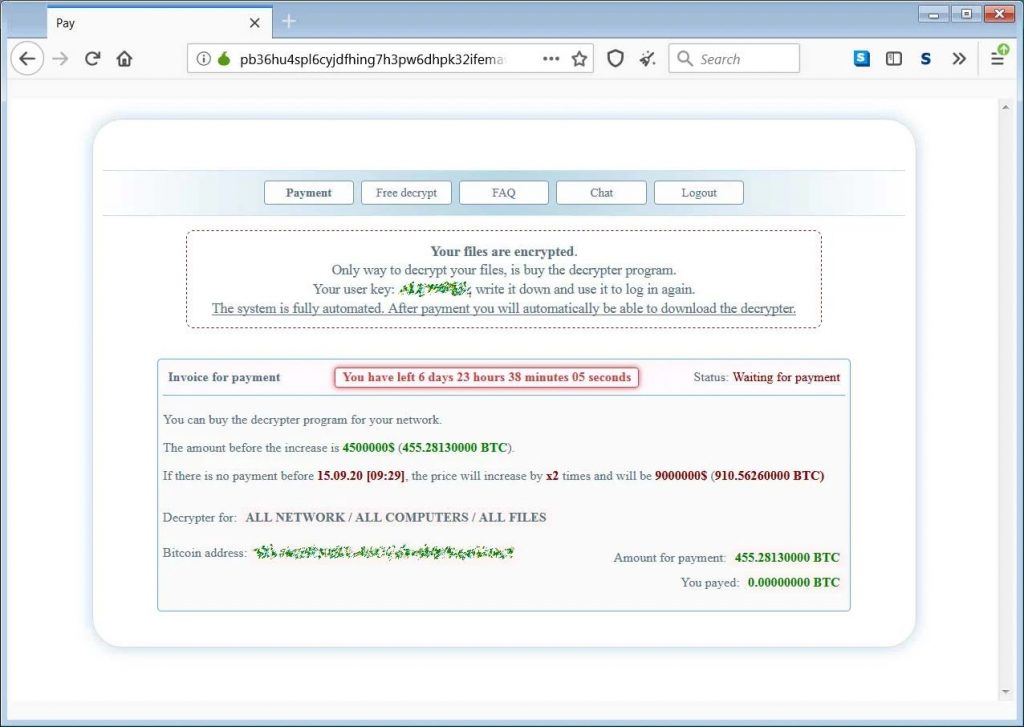
Equinix was reportedly hit with a Netwalker ransomware attack in which attackers asked for $4.5 million, threatening to release stolen data to the public. If 7 days lapse without payment, Equinix will face double the ransom amount. It’s not hard to imagine these guys are scrambling right now, assessing all their options.
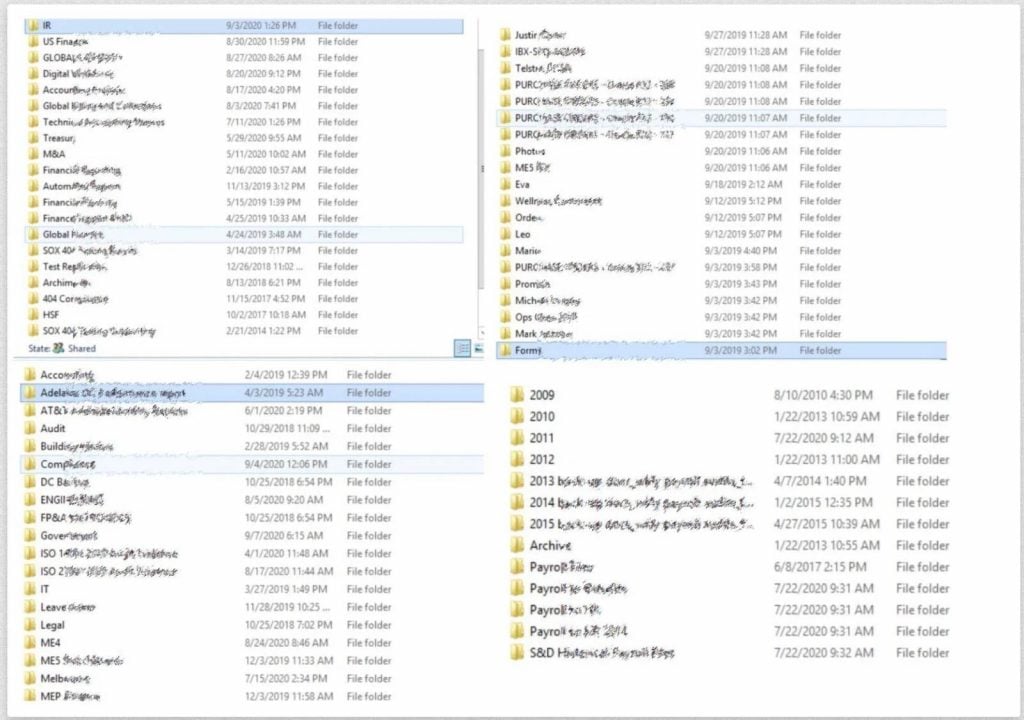
From photos released to the public by the hacking group, it seems data centers in Australia were the weak points for the breach. The information stored in those data centers may also be what’s at risk of exposure.
About Equinix
Equinix is a global data center headquartered in Redwood City, California. Leadership of the organization includes CEO Charles Meyers and Founder Jay Adelson. Equinix is a publicly traded company on NASDAQ (EQIX). With revenue hitting $5.5 billion in 2019, Equinix is a major player in the global data center industry.
Learn More About Ransomware
Don’t be the next victim of a ransomware attack. Strong cloud-based sandboxing, frequent firmware updates, & smart network security practices can keep you secure.
SonicOS 7.0 is the latest and greatest version of SonicWall’s firewall operating system. Debuting in August 2020, 7.0 runs the show for TZ, NSa, and NSsp physical firewalls, plus NSv virtual firewalls. Its release coincided with the additions of the TZ570 and TZ670 to SonicWall’s firewall lineup. And SonicOS 7.0 is ready to handle the boundless cybersecurity challenges of today and tomorrow.
The operating system is chock full of new features to extend networking beyond the perimeter for remote work and branch offices. That means greater visibility, control, and ease of management for all your needs. In honor of its version number, let’s walk through 7.0 reasons why this new OS enhances your network security setup.
1. All New User Experience
One of the most noticeable differences between SonicOS 7.0 and its predecessors stares you right in the face. It features a built from the ground up user interface and experience. And that all new build was designed with user-friendliness in mind. That means a new, improved single-pane-of-glass view of your network, so you won’t need a seven & seven after you dive in. Instead, you get a highly intuitive interface that won’t take days of training to learn. Combine that with intuitive device dashboards and redesigned topologies, and being on top of your network is easier than ever. Plus, enjoy zero-touch deployment with the SonicExpress App and auto-provision VPN, so you won’t need to travel to each site to get your new devices setup.
2. Simplified Management
This goes hand in hand with the user experience of SonicOS 7.0. What it means is, creating firewall policies and managing them won’t give you headaches. How you may ask? The new OS features rule visualization with insight into the type of traffic the rule is for, what it does, and what traffic it affects. On top of that, you can inline edit rules. In the past, adding, removing or changing rules could lead to misconfigurations, potentially exposing your network to attack. But new features like visibility in custom rules and hit counts, shadow rule detection, and rule optimization help you all but eliminate them.
3. Stop More Encrypted Threats
You’ve likely heard that encrypted threats have become more and more of a problem lately. What are they? Put simply, they are malware & other threats that hide themselves in encrypted traffic, camouflaging them from many security solutions. And they’re not going anywhere. SonicWall’s Mid-Year Update to its 2020 Cyber Threat Report says there have been 1.7 million of those documented so far this year.
SonicOS 7.0 arms you to stop them. The advanced protection you get features TLS (Transport Layer Security) 1.3 decryption – which spots those camo’d threats & blocks them from stopping you. The best part? This inspection doesn’t sacrifice your network’s performance, often a tradeoff with added layers of security. The advanced protection is on top of the already robust TLS/SSL decryption and inspection – as well as deep packet inspection of SSH – SonicWall already offers with its firewalls.
4. Clear and Present Visibility
The latest SonicWall operating system also features the latest – and most comprehensive – view into your network. We mentioned those device dashboards and redesigned topologies earlier. To dive deeper, it means a detailed view of your firewall and the endpoints behind it. That includes including dashboards that detail the traffic passing through your firewalls, who’s responsible for it, and any threats that traffic contains. The latest SonicOS Notification Center shows you actionable alerts to help you take immediate action on any firewall-related events. On top of that, a new Capture Threat Assessment Report offers executive-level, summarized insights into traffic, risky applications, and a variety of malware & other threats. With more business leaders focusing on cybersecurity than ever before, a simple, high-level snapshot of your network is vital.
5. Integrations Made Easy
Your network may not stick to one brand – or type of – solution, but you want them all to work together. SonicOS 7.0 makes that easy, with new Rest APIs (or application programming interfaces for the uninitiated). These Rest APIs in essence allow your SonicWall solutions to talk to other software. The others in this case include hybrid policy orchestrators and lots of acronyms:
In this time of the widespread workforce, ensuring secure, reliable, & fast remote access is a must. SonicOS 7.0 helps you step up to that challenge with optimization for high-speed VPN (virtual private networking). High-performance IPSec VPN allows the firewall to act as a VPN concentrator for thousands of other sites, from branch offices to home offices. And for an even simpler remote access option, clientless SSL VPN technology or easily manageable IPSec VPN clients give your teleworkers secure access to files, email, intranet sites, & any network apps they need. On top of that, route-based VPN allows you to seamlessly reroute VPN traffic between endpoints through alternate routes to ensure continuous uptime in case of a tunnel failure.
7. The Company It Keeps
Aesop once said “A man is known by the company he keeps.” To judge SonicOS 7.0 by that measure, it keeps pretty good company. As mentioned earlier, SonicOS 7.0 runs the new TZ570 and TZ670 firewalls. What’s so special about them? They’re the first desktop devices to offer multi-gigabit malware and ransomware protection, with the TZ570 boasting 5GbE, and the TZ670 10GbE interfaces for added high-speed connectivity. In addition, SonicOS 7.0 plays nice with Network Security Manager (NSM) 2.0. NSM 2.0 is a multi-tenant firewall manager that brings admin functions together in one place. Where do you go to get started? As we always say, it starts with the firewall…
Small businesses, branch offices, and nationwide distributed enterprises are facing a common enemy: human error. Misconfigured firewalls can be attributed to 99% of network breaches. Enter SonicWall Network Security Manager – a centralized management service that minimizes human touchpoints wherever possible.
The ability to deploy network changes en masse across your network—no matter how big it may be—is a critical component of doing business in 2020. Traditionally, a strong network security posture relied on solid firewall management practices and large, complex systems. These huge security ecosystems, politely referred to as “robust,” eat up time and money, and until recently that black hole of resources signified your company was doing all it could to win the cyber war.
SonicWall Network Security Manager ends the insanity of ballooning security budgets, endless change documentation, and the headache of clicking through a dozen browser tabs to get the whole picture.
What is SonicWall Network Security Manager?
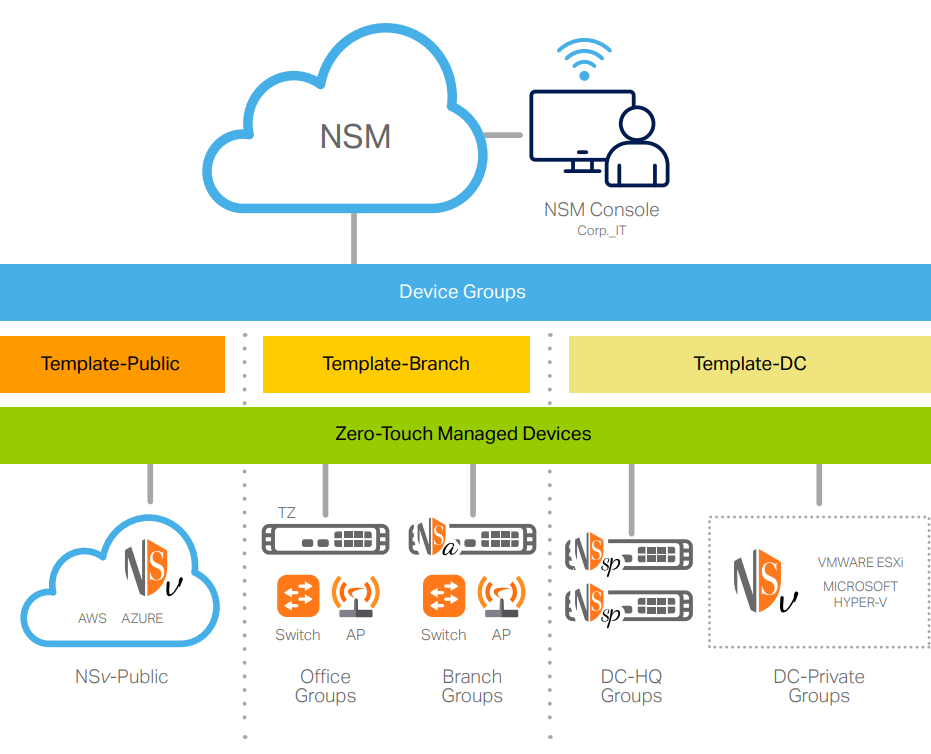
SonicWall Network Security Manager (NSM) is a multi-tenant firewall manager that centralizes admin functions under one roof. Auditable workflows lighten the IT load in addition to allowing for error-free management and network changes. A native analytics engine provides single-pane-of-glass visibility so you won’t waste your day hopping between tabs and applications looking for basic management functions. By creating a full audit trail of all configuration change and providing deep reporting, SonicWall Network Security Manager simplifies compliance too.
Elevate your security by seeing hidden risks and eliminating operational disarray. The ultimate goal of your business is to grow, and SonicWall NSM ensures your network remains manageable even if you need to scale up fast.
Benefits of SonicWall NSM:
Reduce security management overhead costs & wasted time
Document all changes to meet compliance & stay organized
Even small businesses can forge a path to comprehensive management, analytics, and reporting without the need for hiring a roster of costly experts. Automated workflows form a fully coordinated security governance strategy that fits networks of two firewalls to 200, all visible on a single screen.
How does SonicWall NSM work?
NSM empowers you with increased visibility, group-based device control, and the ability to scale at any pace. By visualizing your entire network in one dashboard, Network Security Manager serves up several unique features:
Much of the heavy lifting is done by automation and templates, minimizing both the workload on your admin and the potential for that pesky human error to throw a wrench in the works. By applying a series of rigorous configuration procedures, NSM removes the guesswork and “free hand” management issues that plague so many businesses.
Approval groups are flexible, with varying audit procedures and authorization levels that allow for programmatic deployment of fully validated, documented, and efficient security policies.
Plus, SonicWall Network Security Manager’s RESTful API availability offers a standardized approach to managing individual features and allows compatibility with third-party management consoles you may already use.
Network Security Manager vs Capture Security Center
So what about SonicWall Capture Security Center? SonicWall Network Security Manager is picking up all the same jobs that Capture Security Center handles, plus some!
Here are a few key differences between SonicWall Network Security Manager and Capture Security Center:
Max devices manageable per tenet:
Capture Security Center – 10
Network Security Manager – Over 100
Full configuration audit trail:
Capture Security Center – No
Network Security Manager – Yes
RESTful API for 3rd-party compatibility:
Capture Security Center – No
Network Security Manager – Yes
Group-level visibility, reporting, & dashboards:
Capture Security Center – No
Network Security Manager – Yes
If you currently use SonicWall Capture Security Center, no sweat! CSC MA-licensed customers will automatically migrate to equivalent NSM licensing at no cost.
How is SonicWall Network Security Manage licensed?
In keeping with tradition, SonicWall offers two variants of NSM: Essentials and Advanced. The key difference between the two levels revolves around your reporting needs. Network Security Manager Essentials includes 7-days of reporting. Network Security Manager Advanced includes a full year of reporting, plus 30 days of log analytics.