Barracuda Backup Review: Info, Specs, & Pricing

What is Barracuda Backup?

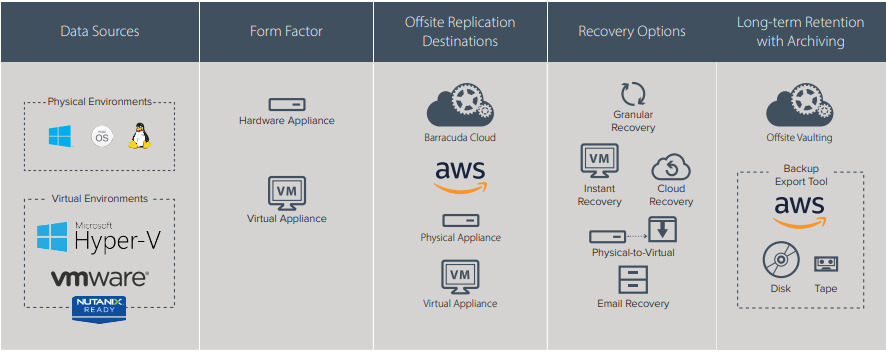
Barracuda Backup protects you against data loss no matter what. Available as both hardware appliances and cloud-based virtual machines, Barracuda Backups deliver constant data protection while replicating it in off-site archives.

That means ransomware has met its match. Files get encrypted? You’ve got backups! Disaster wipe out your whole office? You have copies in the cloud. In sum, Barracuda provides rapid recovery from data loss incidents, letting your business get back up and running fast.

You have a number of options available to help you quickly recover:

  • LiveBoot
  • Cloud LiveBoot
  • Physical-to-Virtal (P2V)
  • LiveBrowse

Blog Banner General Buy Now Red-High-Quality

What does a Barracuda Backup Do?

Barracuda Backup appliances run constantly in the background of your network, taking full backups of data and company resources hosted there. Inline replication sends backups of your data to an off-site storage server where the data is housed until needed.

If you experience an event that results in data loss, you’ll have multiple options to quickly and easily get that data back. You can vault historical data revisions to the cloud for up to 7 years! Need longer-term than that? Barracuda Backup also supports archiving in AWS Simple Storage Services and Glacier.

As mentioned, deployment is flexible with physical and virtual appliance options. Compatible host-level virtual environments include:

  • VMWare vSphere
  • Microsoft Hyper-V

Barracuda Backup Options

Does the backup take a lot of time/money?

Thanks to inline deduplication, which comes standard on all Barracuda Backup products, organizations can greatly reduce bandwidth requirements and write time. Deduplication makes data transfers faster by reducing the total number of bytes that must be sent.

Barracuda deduplicates data as it is received so duplicate copies of repeated data are eliminated. This results in an overall small storage footprint. And a small storage footprint translates directly into less cost for you.

How much does Barracuda Backup cost?

Barracuda Backup pricing is very forgiving for small businesses. The Barracuda Backup Server 390 costs just a smidge over $3000 and has available usable storage of up to 4 Terabytes. That works out to roughly 75 cents per Megabyte of data. Plus, this cost-per-megabyte ratio gets even cheaper on larger units. That’s data protected, data archived, and data safe from the threat of ransomware.

Frequently Asked Questions:

  • Why do I need a data Barracuda Backup solution?

There are several threats out there that can lead to massive data loss. Ransomware has exploded in popularity, hurricane season is here (or always lurking), and sometimes malicious or neglectful employees just delete stuff. Having multiple, redundant copies of your business’s most important resources is crucial. Like car insurance, you won’t really appreciate or notice it until you need it!

  • Why not just use an external hard drive?

Data loss can happen at any time: even 10 minutes before your next scheduled manual backup to an HDD. Plus, that hard drive represents just one more copy of your important data. Barracuda Backups are automated, scheduled around the clock, and keep multiple historical revisions that you can fall back on at any time. An integrated offsite backup solution leaves no cracks for your data to fall through.

  • Why Barracuda Backups over similar solutions?

Barracuda Backups create both a local copy of protected data as well as multiple offsite copies that are all monitored and managed by Barracuda Central as part of a monthly backup subscription. This makes managing your backups easy.

  • Will Barracuda Backup help me meet compliance regulations?

Yes. Barracuda Backup is ideal for meeting compliance requirements like HIPAA.

Blog Banner General Buy Now Red-High-Quality

  • Where is my data stored?

Barracuda combines on-site appliance storage of your backups with off-site backups at a secure, remote location. On-site storage means you can restore your data super-fast for small local incidents while off-site storage is ideal in cases where your network is heavily compromised or struck by disaster.

  • How much data can be stored on the appliance?

On-board storage for these appliances starts on the low end with a usable storage capacity of 1 Terabyte for the Barracuda Backup Appliance 190. The largest appliance caps out at 112 Terabytes on the Barracuda Backup 1090. No matter how much data you’ve got to store, Barracuda leaves plenty of room.

What is the Fortinet Security Fabric?

The Fortinet Security Fabric: An Overview

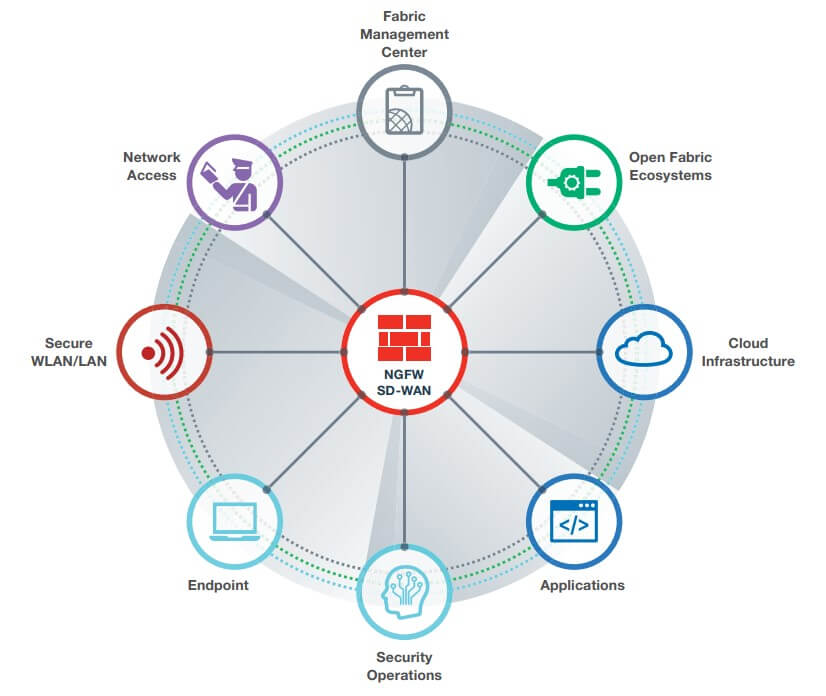
Whether you own a Fortinet product or you’re just shopping around, the Fortinet Security Fabric is a term you’re probably seeing a lot of these days. But what is it? Just like actual fabric – many individual fibers weaved together – the Security Fabric is Fortinet’s vast security portfolio intertwined. In short, it’s an integrated solution allowing you to see, manage, and secure your network products in one place. In long? Let’s get into it.

Blog Banner General Buy Now Red-High-Quality

Fortinet Security Fabric

It Starts With the Firewall

Here at Firewalls.com, we often refer to a firewall as the cornerstone of any network setup. The Fortinet Security Fabric treats it that way as well. It’s the hub around which all the spokes of the wheel connect – forgive the mixed metaphors. In this case, with your FortiGate next generation firewall – aka NGFW – you can coordinate the behavior of other Fortinet (and partner) products. That means your FortiGate can run your security show with visibility into all corners of your network. And by the way, it can also function as a Secure SD-WAN powerhouse in case you’ve missed that news. It supports a variety of other security technologies all under the same FortiOS operating system, including:

  • Secure Wi-Fi and Switching Access
  • Network Access
  • The single-console Fabric Management Center
  • Open Fabric Ecosystems for partner integrations
  • Cloud Infrastructure
  • Business-Critical Applications
  • Security Operations for automated threat detection, prevention, & response
  • Endpoint Protection

What is the goal of the Fortinet secure access solution?

The Fortinet secure access solution as it’s sometimes termed, encompasses secure switching and wireless. The goal is network access that’s easy to manage for admins while at the same time high performing for users.

Access is a word that pops up a few times in this conversation – as both creating and controlling it is key for an optimized, secure network. The Security Fabric integrates with FortiAPs to provide and manage secure wireless access and FortiSwitches to do what switches do – essentially create a network. And speaking of access, with the Fortinet Security Fabric, you can implement a zero-trust network access policy throughout your network.

It starts with network access detection, continuous monitoring,  and control. Next, you can implement multi-factor authentication with a solution like FortiToken. Finally, ongoing visibility and access control of all your endpoints is a must – something you can accomplish with FortiClient. When implemented together, you’ll make it extremely difficult for hackers to gain access to your network – keeping your important data secure.

Blog Banner General Buy Now Red-High-Quality

How does the Security Fabric secure my network?

The Security Fabric is designed with network security as a priority. Fortinet refers to this as security driven networking. This begins with the FortiGate firewall as the front-line network protector. But it also includes the secure access solutions of the switch and wireless appliances, and dynamic cloud security to secure your cloud presence.

We’ve already discussed some of the role the FortiGate plays in the Security Fabric, but let’s expand a bit more. We already know the FortiGate is a firewall. But it also includes other critical security measures. These include a secure web gateway to help stop phishing attacks, SSL/TLS decryption to catch encrypted threats without slowing performance, and intent-based segmentation. And we can’t forget about the Secure SD-WAN component which extends this security outside the physical boundaries of the office to branch locations.

As for the cloud, the Security Fabric integrates a wide array of cloud-based security solutions. We know everyone has some type of cloud presence, so staying protected in that space is paramount. In addition to the FortiGate firewall, Fortinet offers FortiWeb web application firewalls. Email is also a major player in the cloud, and we know that email is a main entry point for malware. The good news is FortiMail is built to stop both traditional and advanced email threats.

Another note on all this security talk. The Fortinet Fabric Manager is your single console to manage all of the solutions mentioned above – and more. But the beauty is you won’t have to micromanage your security. Fortinet’s solutions heavily leverage artificial intelligence and automated security. FortiGuard AI incorporates real-time threat data gathered by FortiGuard Labs to ID and stop just about any online hazard you can think of. In essence, Fortinet Security Fabric solutions are constantly working behind the scenes to stop threats.

Who are Fortinet Security Fabric partners?

The list of Fortinet Security Fabric open fabric ecosystem partners is too numerous to include here. But these partners include heavyweights like Amazon Web Services, Google Cloud, Intel, Oracle, and Siemens to name just a few. The partners leverage the Security Fabric to offer end-to-end security solutions in partnership with Fortinet. It’s just one more way your network gets comprehensive coverage.

How do I get started with the Security Fabric?

We’ve touched on a number of aspects of the Security Fabric in this piece. But in the end, as in the beginning, it all comes back to the firewall. To get started on your Security Fabric journey, find the FortiGate firewall that’s right for your network.


SonicWave vs Ubiquiti Wireless Access Points

SonicWave vs Ubiquiti Wireless Access Points

Comparing SonicWave wireless access points to competitors like Ubiquiti can pose a challenge. Which stats are important when selecting an AP? What makes SonicWave so secure? How does  high performance Wave 2 wireless factor in when it comes to super fast WiFi at a low total cost?

SonicWave is the latest series of wireless access points from SonicWall. In short, Wave 2 wireless provides:

  • Gigabit WiFi potential
  • More bandwidth for connected devices
  • Additional 5 GHz channels
  • Improved user experience
  • Beamforming & bandsteering

Blog Banner General Buy Now Red-High-Quality

SonicWave 224W

Beamforming & Bandsteering

In the past, wireless coverage acted sort of like a lightbulb. For instance: you turn it on, light spills out in all directions, and the whole room is evenly lit. Beamforming is more like a flashlight (or a torch for our UK friends). That is to say, it allows more direct and focused paths for connectivity. When a device attempts to connect to your wireless AP, onboard engines determine which channel and device will provide the highest quality connection at the time.

To sum up, key benefits of beamforming include:

  • More stable, reliable connectivity
  • Faster data transfers & fewer errors
  • Reduced interference
  • Better “signal-to-noise” ratio

In addition, bandsteering is a game changer for WiFi. Bandsteering is the process of using dual-band WiFi, allowing APs to choose which Gigahertz band will provide the highest performance.

  • 2.4 GHz – Slower data transfer, more interference, but larger coverage area & penetration
  • 5 GHz – Higher speeds, more reliable connections, & less congestion

Sometimes the higher capacity 5 GHz band is the faster option. However, in some cases the 2.4 GHz can be the best bet if 5 GHz is congested or a little out of reach. With bandsteering, you do not have to decide. SonicWaves automatically connect to the most efficient band. In other words, the AP does the thinking for you.

Go Controller-Free with SonicWave

SonicWall SonicWave APs feature easy deployment and management options that lower costs. There is no need to purchase a separate wireless controller because your wireless network can be managed through the firewall. Single pane of glass management means less clicking around in multiple tabs and windows to find what you’re looking for. You also have the option of SonicWall’s WiFi Cloud Manager, which offers several bonus features of its own.

Blog Banner General Buy Now Red-High-Quality

Network Security Integration

SonicWall comes backed by multiple decades in the greater network security world. While Ubiquiti excels in their own little fish bowl, SonicWall is a shark that has prowled every corner of the cybercrime seven seas. Above all, SonicWave access points integrate into a larger, centrally managed network with real-time communication and unified threat protection operating across several security layers.

Because SonicWall sports a pedigree in security, SonicWave APs are built with security foremost in mind. That means SonicWaves benefit from:

  • Automatic firmware updates
  • Security alerts & rich analytics
  • SSL/TLS decryption & inspection
  • Wireless intrusion detection & prevention

Dedicated Security Radio

SonicWave 400 series access points include three radios. The first two radios operate on the 2.4 GHz and 5 GHz bands. Most importantly – when it comes to a protected network – the third radio is there just to secure your WiFi! SonicWave’s security radios scan for rogue access points and perform other wireless security tasks. Additional security-related features include:

  • Rogue AP Scanning
  • Virtual AP Segmentation
  • RF Monitoring
  • Passive Scanning
  • Wireless Packet Capture

SonicWave 432i vs Ubiquiti Quick Comparisons

Here we break out a few quick side-by-side stats comparing SonicWave APs vs a Ubiquiti UniFi Pro:

Antennas

  • SonicWave: 8 fully internal antennas
  • Ubiquiti: 3 dual-band antennas

802.11ac Max Date Rates

  • SonicWave: 2.34 Gbps – 3.47 Gbps
  • Ubiquiti: 450 Mbps – 1.3 Gbps

Interfaces & Ports

  • SonicWave: (1) 10/100/1000 RJ-45 Ethernet/PoE; (1) 100/1000/2.5 GbE RJ-45 Ethernet; (1) RJ-45 Console; (1) USB 2.0
  • Ubiquiti: (2) 10/100/1000 RJ-45 Ethernet; (1) USB 2.0

MIMO

  • SonicWave: 4×4 MU-MIMO
  • Ubiquiti: 3×3 MIMO

If you’re looking for the bare bones to get a Wi-Fi network up, a Ubiquiti UniFi access point may do the job. If you’re serious about wireless networking, unified security, and user experience, a SonicWave 432i or SonicWave 231c is a better fit for you. SonicWave access points come with the peace of mind that your wireless equipment was home-grown by a company steeped in network security know-how. The demand for fast, stable wireless access continues to grow. Therefore, the volume and variety of advanced attacks targeting WiFi networks will also grow. A SonicWave wireless AP is the way to go for small businesses with cyber security in mind.


SonicWave vs SonicPoint: Comparing Wireless APs

SonicWave vs SonicPoint: Comparing SonicWall Wireless APs

The wave of the future in SonicWall wifi is here with SonicWave wireless access points. To compare SonicWave vs SonicPoint is to compare the future to the past. SonicWave’s predecessor – SonicPoint wireless APs – retired in 2019, but their wifi footprint remains large. For those with active SonicPoint devices or those shopping for wireless networking solutions, it’s worth taking a look at what both model lines have to offer. Let’s compare and contrast SonicWall’s latest wireless line with it’s previous entry into the wifi space.

Blog Banner General Buy Now Red-High-Quality

The New Wave

When it comes to many of the differences between these two model lines, much simply has to do with differences in the technology available at launch date. In other words, older SonicPoints support older performance standards, while newer SonicWaves are ready for whatever today has to offer. Perhaps the biggest difference that puts SonicWaves ahead of SonicPoint APs is support for 802.11ac Wave 2 wireless technology. Wave 2 offers a couple of clearly enhanced capabilities that give SonicWave access points a performance edge:

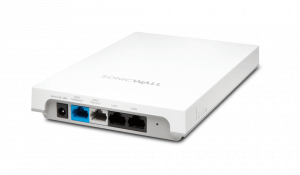
SonicWave 224W

SonicWave (Wave 2 Technology)

  • 4 data streams
  • 160 MHz channel usage

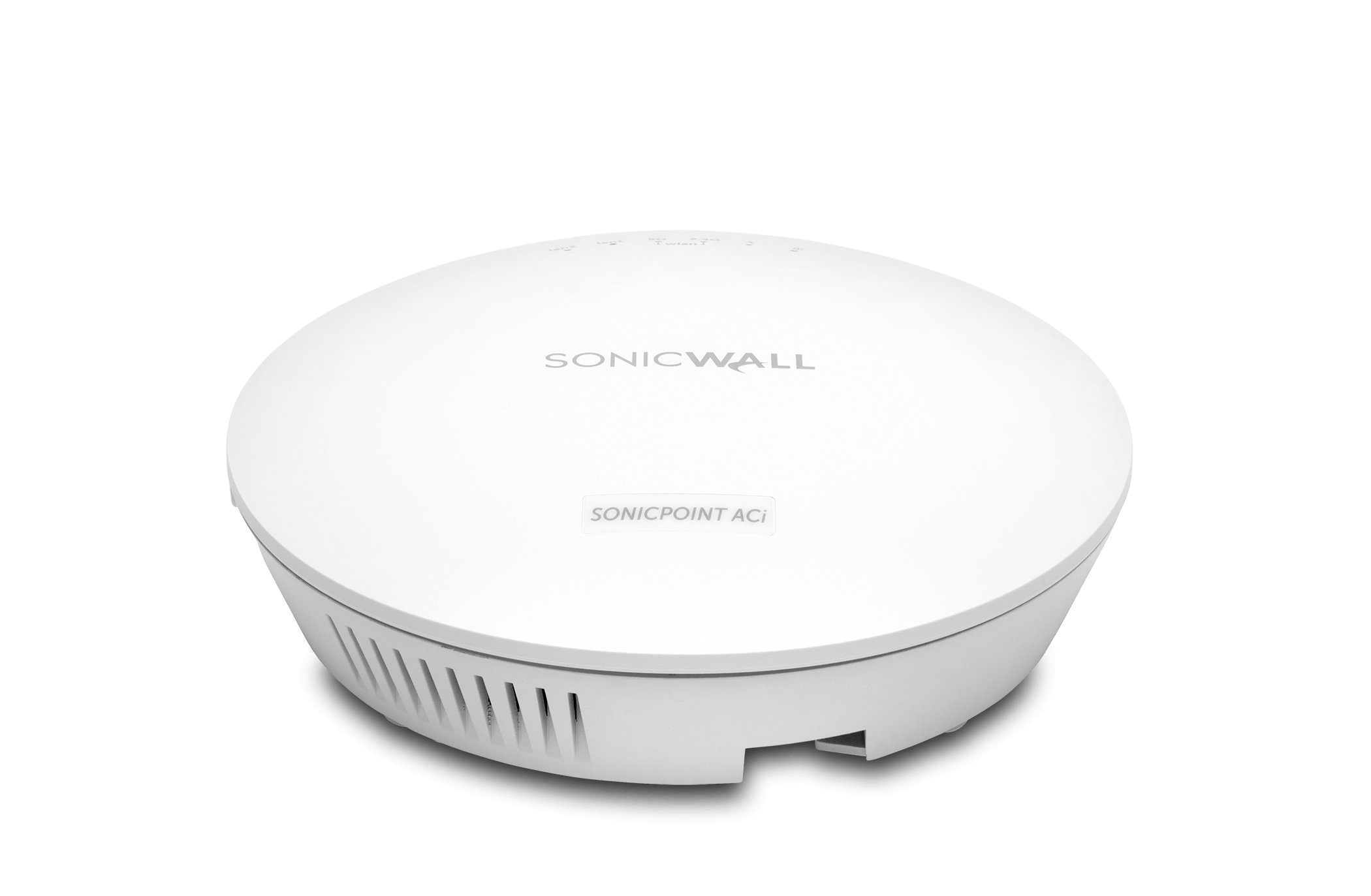
SonicPoint ACi

SonicPoint (Prior Generation)

  • 3 data streams
  • 80 MHz channel usage

The math is pretty simple there. The larger the bandwidth and the more data streams means more devices supported and better performance. And onto another improvement that relates to Wave 2.

MU-MIMO es SU-MIMO

SonicWave models support MU-MIMO instead of SonicPoint’s SU-MIMO. In case you’re unfamiliar, MIMO stands for multiple-input, multiple-output. SU stands for single user, while MU is multiple users. What it’s meant to address is a lag in performance on a network with many users.  The MU-MIMO technology found in Wave 2 devices better accounts for today’s mobile-device heavy environment, while SU-MIMO was designed with primarily laptop usage in mind. MU-MIMO allows a wireless connection to simultaneously transmit and receive data between multiple supported devices at a time, as opposed to just one with single-use. That means better performance, more device support, and a reduction in the dreaded lag.

Deployment Options

There are simple physical differences when comparing SonicWave vs SonicPoint models. That is, SonicPoint offered only indoor-capable wireless access points. But the SonicWave series gives you options for whatever your needs, including if those needs include a more rugged appliance. SonicWave has models designed for the traditional indoor ceiling and wall mount, while also offering models specifically designed for outdoor deployments. The SonicWave 231O and 432O are IP67-Rated and feature industrial-grade enclosures meant to stand up to harsh environments. Basically, they can go wherever you need wifi.

Security and Integration

These features go hand-in-hand. SonicWall is always taking network security into account with any solution it offers. Both SonicWave and SonicPoint models support wireless data encryption. But the SonicWave series goes several steps further. SonicWaves are designed to integrate with SonicWall next generation firewalls to take advantage of the robust security they offer – like deep packet inspection to block network threats – as well as single-pane-of-glass management. If you don’t have a SonicWall firewall though, SonicWave APs can perform advanced security services, including the powerful, zero-day stopping Capture ATP sandbox service on their own.

Plus, most SonicWave APs include three radios, with the third fully focused on security. The third radio performs rogue AP detection, passive scanning, and packet capturing. But wait, there’s more! SonicWaves also integrate additional security-related features including:

  • Wireless intrusion prevention
  • Virtual AP segmentation
  • Wireless guest services
  • RF monitoring
  • Packet capture

And as mentioned, you can manage them through your firewall, or with SonicWall’s WiFi Cloud Manager – an intuitive, cloud-based WiFi network management system ideal for networks of any size.

Blog Banner General Buy Now Red-High-Quality

Availability

This one’s perhaps the easiest comparison of SonicWave vs SonicPoint. If you’re looking for new wireless APs, it’s SonicWave or bust. The last SonicPoint models reached end of sale in spring of 2019 (with end of support looming in 2022), so the choice is clear. Shop the SonicWave 200 or 400 series to find the right fit for your networking needs.


How to Choose a Cisco Meraki MS Switch for your Small Business

Shopping for Cisco Meraki MS Switches

Cisco Meraki MS Network Switches provide Layer 2 switching that unifies devices. Meraki switches fit best in small businesses, branch offices, distributed enterprises, campuses, and other complex deployment settings. These gigabit switches include SFP+ uplinks on all models. At the high end, Meraki switches reach up to 800 Gbps of switching capacity.  In other words, a Cisco Meraki MS Switch is an ideal fit for a wide range of situations.

Managed through a simple single-pane-of-glass interface, Cisco Meraki MS switches excel in the cloud. Extend greater visibility and control across the network. Because of these features, admins can easily track:

  • User activity
  • Security events
  • Configuration changes

Cisco Meraki MS Switches are stackable. So SMBs can easily add future switches to meet business growth – perfect for scalability.

Blog Banner General Buy Now Red-High-Quality


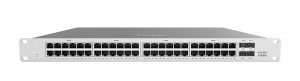
Cisco Meraki MS Switch MS120-48

Why Cisco Meraki MS Switches?

Network switches connect all the devices your business uses. Whether they be VoIP phones, wireless APs, firewalls, SMA devices, or others, a switch acts at the central hub of traffic routing. Cisco Meraki MS Switches intelligently link devices across your network. As a result, admins can take control with:

  • Role-based administration
  • Fully cloud-based management
  • Remote diagnostics tools
  • Packet capture
  • Automated downtime email alerts

Cisco Meraki MS switches let small businesses take advantage of enterprise-grade features without paying enterprise prices. In addition to traditional Ethernet features, MS switches include:

  • MAC Whitelists & MAC Authentication Bypass (MAB)
  • Dynamic ARP Inspection
  • VLAN configuration settings for individual ports
  • Traffic monitoring through port mirroring

And there’s more: deploying a Cisco Meraki MS switch is simple. Plug it in. That’s it.

With auto-provisioning, SMBs that lack IT talent can quickly deploy across multiple sites. That is to say, no messing around with command lines. No complex setup needed. Zero-touch deployment makes Meraki switches a plug-and-play experience.

Choosing a Cisco Meraki MS Switch

Finding a network switch can be a challenge if you’re not familiar with important tech specs and features. So here are a few key features to keep an eye out for:

Power Configuration

Cisco Meraki MS switches include a single power supply, with additional power supply units sold separately. Power supply configurations are hot-swappable, so you can say goodbye to downtime.

Switching Capacity

Switching capacity refers to the total amount of data that a network switch can handle. Vendors measure this in Gbps. If you’re getting a gig or more from your ISP, then you’ll want a network switch that can handle that traffic volume without losing the speed you paid for.

Interfaces

The whole point of a network switch is to act as a central hub. That means you’ll want a lot of ports and types of interfaces to meet the needs of your setup. Cisco Meraki MS switches come in:

  • 8-port
  • 16-port
  • 24-port
  • 48-port

Uplinks

Network switch uplinks are important for stacking. To clarify, uplinks allow two similar devices to directly connect. Whereas devices once required a crossover cable to “talk” back and forth, an uplink port allows your MS appliance to internally route communication between devices.


Blog Banner General Buy Now Red-High-Quality

Still Have Questions about Network Switches?

To sum up, Cisco Meraki MS switches are great for SMBs and branches to centralize all their devices. Firewalls.com provides plain-language product knowledge to our customers. This ensures you make a wise security investment. Next, check out our other network switch tools to see if a Cisco Meraki switch is right for you.

Read our article “Five Things to Consider Before Buying a Network Switch“

Watch our Video Buyers Guide for Network Switches


← Older posts Newer posts →