Barracuda CloudGen Firewall – A Walk in the Clouds

What is a Barracuda CloudGen Firewall?

Barracuda CloudGen Firewalls offer physical, virtual, and cloud-based options to secure networks wherever users are. That means they protect today’s cloud-connected users and their networks beyond the traditional perimeter.

So that’s the simple answer. But what makes CloudGen appliances stand out from the next generation firewall crowd? How about we go over what these firewalls have to offer when it comes to securing networks large and small.
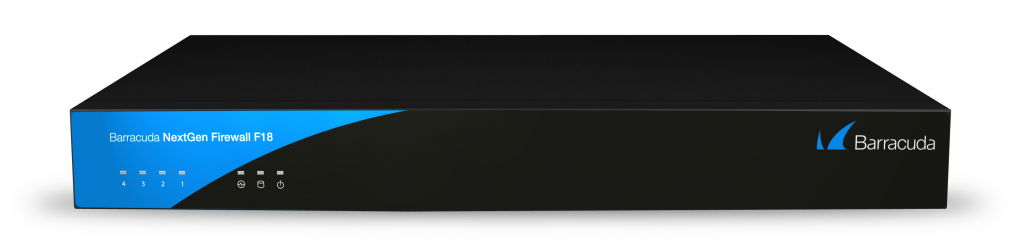
Barracuda F18 Firewall

Barracuda CloudGen Firewall Specs

Focusing on the physical, F-series firewalls come sized for just about any business need. Even the smallest of these, the F12, supports a substantial number of concurrent sessions. Starting at 80,000 for that model, the concurrent session count grows into the millions as you reach high-end devices.

Another important thing to note: F-series firewalls feature the same comprehensive security features you’ll count on to stay protected no matter the model. What features you may ask? Here are just a few:

  • Intrusion Prevention Systems (IPS)
  • Application control
  • Dynamic routing
  • Application-based provider selection
  • SSL interception to read encrypted traffic
  • SD-WAN for simple, affordable, secure branch connectivity
  • Web filtering
  • Client-to-site and site-to-site VPN to connect your remote workforce

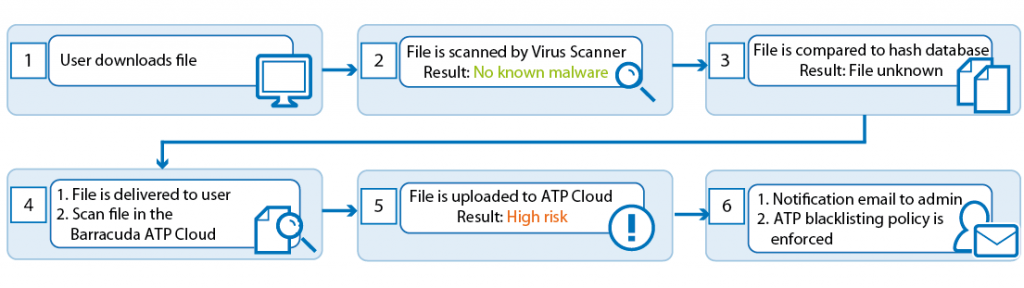
On top of all that, if you’re worried about your firewall supporting resource-intensive tasks, don’t fret. Tasks like sandboxing and more are offloaded seamlessly to the cloud. And with all of these features, getting your protection up and running is a snap too, with zero-touch deployment. We should mention too, that cloud-based and virtual models generally come standard with these very same features.

Barracuda Firewall Models

The Barracuda CloudGen family includes F-series hardware, VF-series virtual, and AWS, Azure, & Google cloud-based firewalls. Options span user counts of 5 to several thousand to protect networks of any size, anywhere. For example, the F-Series starts with the F12 and tops out at the F1000. On top of that, virtual varieties go from VF10 (for 10 IPs) to VF8000 (for an unlimited number). Finally, when navigating cloud-based firewalls, you start at Level 2 and work up to Level 8. And even more finally, choose the PAYG cloud firewall for a time-based, pay as you go model.

Barracuda CloudGen Firewall Price

Barracuda CloudGen firewalls offer a wide variety of security and networking features for competitive prices. For instance, the small business or branch office F12 retails for about $750. As we often say, you’ll want more than just the firewall to optimize your security. In addition to the many above-noted included features, Barracuda offers security services subscriptions on a monthly basis.

These feature options like advanced threat protection, advanced remote access, malware protection and more. In addition to the competitive prices of these services, their monthly nature gives you greater flexibility to make changes based on your evolving needs. All in all, Barracuda CloudGen firewalls have a lot to offer in today’s perimeter-less network environment.


Virtual Learning: An Education – Ping Podcast – Episode 26

Episode 26: Virtual Learning: An Education

Virtual learning is front of mind when it comes to educating students during the coronavirus pandemic. As we hit back to school season, school districts, colleges & universities consider virtual education, in-class instruction, or a combination of both. What goes into this decision? For an education on virtual learning, we welcome Amy McLaughlin, Cybersecurity Project Director for the Consortium for School Networking – www.cosn.org. She discusses the challenges of virtual learning, how some schools are addressing access, and how student age is a factor in its effectiveness. We also talk about cybersecurity concerns, school funding issues, and more.

In our headlines segment, we talk about some hidden email vulnerabilities that could make spearphishing even more effective. Then, it’s onto the arrest of a GandCrab middle man. And finally, we have updates on the alleged Twitter hack mastermind and WastedLocker ransomware.

How to listen

Listen to Ping – A Firewalls.com Podcast using the player above…

Or just about anywhere you prefer to listen to podcasts (Apple Podcasts, Pandora, Spotify, Google Podcasts, Stitcher, Overcast, TuneIn, iHeart, Pocket Cast, Castro, Castbox, Podchaser, YouTube, and of course via RSS, to name a few). Moreover, please remember to subscribe or follow where you can to get the latest episodes as soon as they’re released. And please rate and review us as well!

Missed our previous episodes? You can get them anywhere you listen to podcasts, or go to our full episode list.

Learn even more about network security through our blog, which features new content every week.

New episodes are usually released every other Wednesday. Have a special request for a topic or a question for our network engineers to address? Email us at podcast@firewalls.com and it could be on our next show. Thanks in advance for any listens, follows, subscribes, reviews, comments, shares, and generally spreading the word!


What Is SonicWall NetExtender & How Can It Improve Your Remote Workforce?

What Is SonicWall NetExtender

SonicWall NetExtender is an application for Windows, Mac, and Linux that allows a remote user to access applications, files, resources, and more from the base network while being protected by that base network’s security apparatus.

To use it, a remote user will need an active SonicWall VPN license. A VPN, also known as virtual private network, is a secure way of accessing company data from anywhere in the world. SonicWall VPNs work in tandem with NetExtender as a means of routing a remote user’s device, desktop or mobile device, safely to the base network.

Blog Banner General Buy Now Red-High-Quality

How Can SonicWall NetExtender Improve Your Remote Workforce

By offering VPN licenses to a remote workforce, you provide your business & users all the same protection capabilities they’d receive if they were working in the office. When remote employees work through NetExtender, they have the freedom to work at efficient speeds with more direct access to files and apps. On top of that, they get security capabilities only available to users connected to your base network.

Benefits At A Glance

  • Access secure files from anywhere in the world
  • Use all the business-critical applications you’re used to
  • Secure communications
  • Extend on-premises levels of security to employees working from home
  • Maintain compliance requirements

How Much Do VPNs With SonicWall NetExtender Cost

SonicWall virtual private network solutions are designed for scalable cost. The solution depends on the number of licenses you’ll need, which VPN protocols you use, and what configuration or support options are included. To learn more about the different types of SonicWall VPN clients that work through NetExtender, check out our comparison between SonicWall SSL VPN & Global VPN.

Blog Banner General Buy Now Red-High-Quality

Looking For A NetExtender VPN Solution?

Configure A Scalable NetExtender Solution

Configuring the right SonicWall VPN solution isn’t the easiest thing to do. Our network security experts are on standby to help guide you through the decision making process. To start your scalable SonicWall VPN solution through NetExtender, call 317-225-4117 or reach out via our secure contact form.


What is Barracuda Essentials? Email security for SMBs

What is Barracuda Essentials?

Barracuda Essentials is an email security solution ideal for small businesses and mid-sized organizations looking to deploy simple, yet feature-rich inbox security. Barracuda Essentials includes a ton of anti-virus, anti-spam, and advanced threat protection elements that prevent email-based attacks. That includes protection against phishing and other social engineering attacks. Oh and by the way, email is the most common vector of attack against SMBs. In fact…

Did you know… 91% of cyberattacks start with an email

Barracuda Essentials provides cloud-based, advanced protection as well as encryption and data leakage protection. What’s more, no additional hardware or software is necessary to add cloud-to-cloud message archiving. With all these powerful features combined, you have no reason to fear ransomware.

Email Continuity of up to 96 hours means your small business can keep sending and receiving business-critical messages even if you experience email outages or loss of Internet. How does it work? Emails fail over to a cloud-based service, letting you use emergency mailboxes so there’s no interruption.

What sets Barracuda email security apart?

  • Stops targeted phishing attacks with URL protection
  • Dynamic threat analysis & real-time threat detection
  • Integrates directly with Office 365 API
  • Centralized management with cloud-based console
  • Cloud-based archiving simplifies compliance

Barracuda Essentials Email Security

Barracuda Essentials locks down small business emails, cutting off the #1 attack vector for modern threats. Most importantly, all these services are cloud-based, meaning there’s no need to download additional software or find space in your server rack for another appliance. This cloud-based protection includes:

  • Anti-Spam
  • Inbound & outbound anti-virus
  • Phishing protection
  • DDoS protection
  • Advanced anti-malware
  • Full-system emulation sandboxing
  • URL protection to foil typosquatting

Quickly filter your entire volume of inbound email traffic to detect & block email threats. Barracuda Essentials protects inbound traffic with advanced features like spam scoring, intent analysis, and reputation checks. Barracuda Essentials is backed by 24×7 threat intelligence from Barracuda Central. To sum up, this global operation center constantly monitors new threats and empowers onboard AI to automatically detect and respond to incidents—even zero day threats.

Easily meet compliance & maintain productivity

Barracuda Essentials includes cloud archiving that is easily searchable, tamper-proof, and redundant. Above all, this simplifies compliance with easy e-discovery, allowing you to search and filter historical message archives to easily locate specific emails.

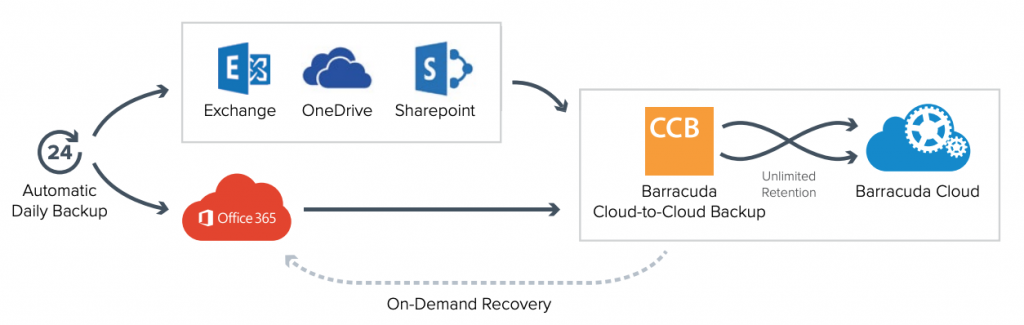
Ransomware is a huge concern for small businesses. Loss of important data can be devastating whatever the cause, but cloud-to-cloud backup eliminates the threat entirely. Barracuda Essentials cloud-to-cloud backup lets you easily restore your data in the event of a loss. In sum, this minimizes downtime, letting your business get back to what it does best. Cloud-to-cloud backup includes unlimited storage, so Barracuda Essentials is an ideal solution to grow with your business.

  • Easily meet compliance demands
  • Reduce ongoing legal risks
  • Automatic de-duplication minimizes storage footprint, saving you money

Barracuda Cloud to Cloud Backup included with Barracuda Essentials

Productivity is a huge concern for small businesses. If inbound and outbound email stops flowing, the lifeblood of small business stops too. With email spooling, you do not have to fear email downtime. Up to 96 hours of email spooling keeps you rolling even in the face of major outages.

Block spearphishing attacks with Barracuda Sentinel

Barracuda Essentials teams up with Barracuda Sentinel when you buy the cost-efficient Total Email Protection bundle. Sentinel defends users on your network from the latest social engineering attacks by utilizing artificial intelligence. And it’s very intelligent. To clarify, Barracuda literally learns the way you write emails to other users in your organization to determine if an account has been taken over or impersonated. This granular user awareness is unprecedented in its ability to predict potential account takeover.

Take a deeper dive into Barracuda Email Security


Diversity & Threat Intelligence – Ping Podcast – Episode 24

Episode 24: Diversity & Threat Intelligence

As a continuation of our look at the cybersecurity career field, we turn our attention to diversity in threat intelligence, how it’s lacking, and why it’s important. On Episode 24 of Ping: A Firewalls.com Podcast, we welcome Roderick Chambers, Cyber Threat Intelligence Consultant with Recorded Future and Truman National Security Project Security Fellow. Roderick discusses his unique background, going from human intelligence in the CIA to cyber threat intelligence, how unique backgrounds should be embraced in cybersecurity, and why representation matters to help protect people online. We also discuss cyber threats relating to our rapidly deployed remote work environment. And we talk about whether you’d rather lose your cell phone or your wallet.

Watch Roderick’s Lighting Talk called Blacks in Intelligence and Threat Hunting. Then learn about the Blacks in CyberSecurity conference and networking group.

In our cyber headlines segment, we talk about a bust of an encrypted chat service for criminals in Europe. Then we hear about some dissatisfied Signal customers. And we wrap up with news of the Biden campaign’s focus on cybersecurity.

How to listen

Listen to Ping – A Firewalls.com Podcast using the player above…

Or just about anywhere you prefer to listen to podcasts (Apple Podcasts, Pandora, Spotify, Google Podcasts, Stitcher, Overcast, TuneIn, iHeart, Pocket Cast, Castro, Castbox, Podchaser, YouTube, and of course via RSS, to name a few). Moreover, please remember to subscribe or follow where you can to get the latest episodes as soon as they’re released. And please rate and review us as well!

Missed our previous episodes? You can get them anywhere you listen to podcasts, or go to our full episode list.

Learn even more about network security through our blog, which features new content every week.

New episodes are usually released every other Wednesday. Have a special request for a topic or a question for our network engineers to address? Email us at podcast@firewalls.com and it could be on our next show. Thanks in advance for any listens, follows, subscribes, reviews, comments, shares, and generally spreading the word!


← Older posts Newer posts →