Emotet is back & badder than ever but Intercept X answers the call

Hardcore fans of the Firewalls.com Blog (yes, we’re aware those don’t exist) may remember our Emotet malware article in March of last year, painting the banking trojan as the cybersecurity world’s biggest villain of 2019 and comparing him to the ever-evolving baddie, Ultron. With recovery costs surpassing a million dollars per incident, this feisty malware can wreak real havoc on small businesses and enterprises alike. A year has passed since that spotlight article, but Emotet is far from being ancient history. In fact, recent trends suggest that the Emotet problem may grow worse in 2020.

Security researchers at Nuspire discovered a huge resurgence in Emotet malware activity throughout Q4 of 2019 including 1,275 unique variants of the malware with 339,000 new strains discovered each week. To support this growth, Emotet has been diligently adding new features to its toolset, allowing for greater versatility in stealing credentials, spreading infection, and pilfering user data.

Same goal, new ways to reach them

We discuss a few of these new capabilities in Episode 13 of Ping: the Firewalls.com Podcast, specifically focusing on Emotet’s ability to scan wireless networks and infect connected devices. Added up with past strategies–spreading through email spam and lateral network movement–this advanced Trojan is proving ever more elusive to detect, identify, and prevent with every iteration.

When Emotet malware made a sharp resurgence in September of 2019, it often paired up with Ryuk ransomware, providing maximum damage to networks once attackers got their foot in the door. Cameos with TrickBot and BitPaymer also demonstrate that Emotet is willing to team up with fellow no-goodniks to cause even greater disaster after an infection.

Best practices to prevent Emotet malware

When it comes to malware, the greatest cure is prevention. Educating users, securing unmanaged devices, and shining a light on network blind spots are all strong preventative measures that can prevent an Emotet outbreak on your network. Focusing on email security training and Business Email Compromise with your staff arms them with the knowledge needed to sidestep Emotet’s widespread spam campaigns.

Sophos Intercept X Advanced with EDR (and other machine learning-powered endpoint protection platforms) monitor the evolving behavior of malware strains such as Emotet, comparing threat data from security sensors worldwide to compile real-time threat data to networks. Intercept X offers multiple layers of security, including detonation of executable files in a secure sandbox environment.

Strong email protection through XG Firewalls provides additional strata of security, scanning outbound emails to detect Emotet spam, identifying which machines are responsible for it, and quarantining them from the network. Fighting off advanced threats such as Emotet requires multiple layers of security with end-to-end visibility and access control. Check out the Firewalls.com Services section to learn how our team of certified network engineers can deploy Access Control Lists, optimize your email security, and monitor your network around the clock with Managed Security Services.


Tip of the Spear – Ping Podcast Episode 13

Episode 13: Tip of the Spear

We went into this episode with our heads in the cloud, specifically the Office 365 cloud. But as we spoke with SonicWall’s Matt Brennan, we not only learned about a spearphishing campaign that targeted O365 late last year, we also learned why spearphishing – and the related issue of business email compromise – has been among the most financially successful forms of attack for hackers over the past decade. We also heard a real-life example of what happened to a clothing retailer just last year following a breach. And on a brighter note, we talked about how to prevent these email-based attacks from ruining your business, with a look at SonicWall Cloud App Security as part of a layered approach to network protection.

Read Matt’s blog about the Office 365 attack, and learn more about Cloud App Security right here on our blog and on episode 1 of Ping.

In our Headlines, we talk about yet another way emotet could get you (via Wi-Fi), some malicious Chrome web extensions also known as malvertising, and why lawmakers and the Government Accountability Office are worried about the cybersecurity of the 2020 Census.

How to listen

Listen to Ping – A Firewalls.com Podcast using the player above…

Or just about anywhere you prefer to listen to podcasts (Apple Podcasts, Spotify, Google Podcasts, Stitcher, Overcast, TuneIn, iHeart, Pocket Cast, Castro, Castbox, Podchaser, YouTube, and of course via RSS, to name a few). Remember to subscribe or follow where you can to get the latest episodes as soon as they’re released, and rate and review us as well!

Missed our previous episodes? You can get them anywhere you listen to podcasts, or go to our full episode list.

New episodes are released every other Wednesday. Have a special request for a topic or a question for our network engineers to address? Email us at podcast@firewalls.com and it could be on our next show!


Fortinet Cyber Threat Assessment for SD-WAN, FortiGate, & FortiMail

The Cyber Threat Assessment Program

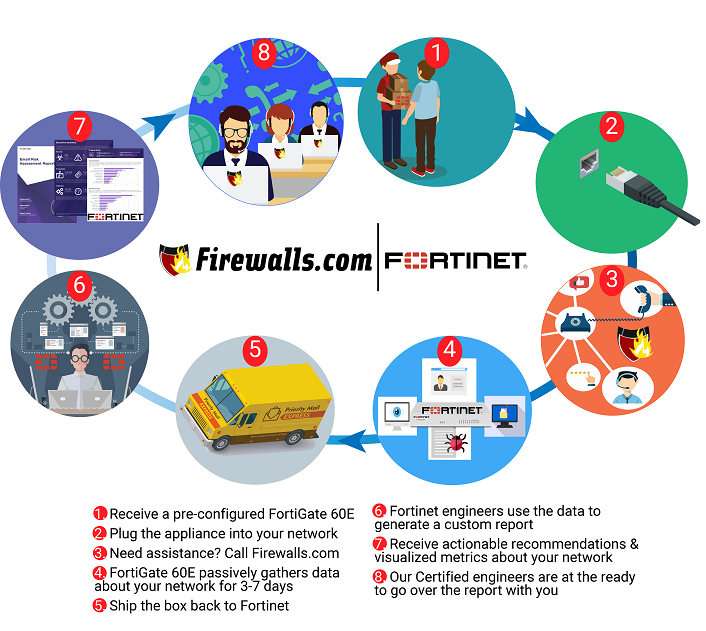
There are exactly two ways to test your network’s security against cyber threats: run validation testing to assess precisely how your network performs or wait for the real thing to happen and draw conclusions while you’re picking up the pieces in the aftermath. While trial-by-fire is certainly a conclusive way to assess your network security, Firewalls.com strongly recommends the former option. Fortinet’s Cyber Threat Assessment Program is a convenient and non-intrusive process that lets you see where your network stands without interrupting day-to-day operations.

The assessment is free of charge, requires little to no legwork on your part, and yields results in just over a week. Check out the infographic below to see how it works, or listen to our recent podcast episode where we discuss Cyber Threat Assessments with Fortinet’s Ben Bolen.

See How Fortinet’s Secure SD-WAN Can Save You Time & Money

Been curious about SD-WAN? The very same process described in the infographic above can be used for an SD-WAN assessment as well! Fortinet’s Secure SD-WAN allows for high-speed application performance at the WAN edge, intelligently determining the ideal routes for MPLS, 3G/4G, or broadband traffic. Since traditional WAN architectures are not equipped to accommodate the high-demand workloads modern organizations who may be using applications spanning multiple cloud environments. Now you’re one FREE assessment away from seeing exactly how Secure SD-WAN can transform your network.


What Information Is Included In CTAP Report?

The Fortinet Cyber Threat Assessment focuses on three key areas: Security, User Productivity, & Network Utilization.

  • Security: Details network vulnerabilities and helps to identify which devices and applications are at an elevated risk so that they can be properly secured. In this section of the report you’ll get to see which vulnerabilities and threats were observed bypassing your existing security solutions.
  • User Productivity: Provides extensive visibility into peer-to-peer, messaging, and other application usage to see how users are using your network in their daily work. In this section you’ll see how spam, newsletters, and other cyber nuisances impact how your users navigate the network.
  • Utilization: Provides real-world numbers about throughput and bandwidth usage during peak traffic. In this section, you’ll get to see when your network resources are needed most and where waste can be eliminated.

No Risk, No Extra Work, No Commitments

The infographic above outlines the basic process for receiving, setting up, and reviewing your results. At no point in the process are you required to make any purchases, change any settings, or meet any deadlines. Fortinet’s Cyber Threat Assessment is a risk-free program that requires no more extra work than plugging in a cord. If at any point you decide you want to end the test, pull the cord back out! That’s it. No money changes hands, no contracts are signed, and no network settings are changed. If you want to dump your final assessment in the trash, no problem. The report is yours to use as you see fit.

Ready For Your Free Assessment?

Getting your Cyber Threat Assessment is as easy as filling out a form on our Fortinet Cyber Threat Assessment Program page. Leave us your contact info and Firewalls.com will work behind the scenes to get a test set up for you. We work closely with Fortinet to make sure the test requires as little effort on your part is possible.


FortiGate 40F – Secure SD-WAN for the Small Business

FortiGate 40F – Secure SD-WAN for the Small Business

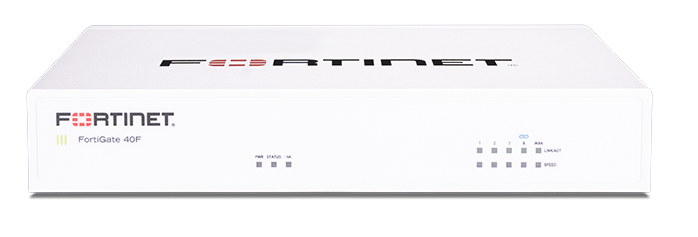
Compact. Fanless. Affordable. Secure. The new FortiGate 40F from Fortinet hits all the marks when it comes to arming small businesses and branch offices with the fast, secure access necessary in 2020. Fortinet is an industry standout in the SD-WAN arena thanks to their innovative SoC4 SD-WAN ASIC processor. You may recognize this mighty, mini-sized processor from Fortinet’s other recent additions: the FortiGate 100F & FortiGate 60F. Fortinet’s best-of-breed SD-WAN allows for intelligent application steering, scalable VPN capabilities, and other advanced networking capabilities.

Blog Banner General Buy Now Red-High-Quality

The best part? While boasting all of the SD-WAN capabilities of its larger cousins, the tiny FortiGate 40F also reaches maximum throughput speeds up to 5.0 Gbps. For an appliance built with small offices in mind, those speeds are insane!

Learn more in our 40F feature review video:

FortiGate 40F Spec Snapshot

FortiGate 40F with Secure SD-WAN

Fortinet FortiGate 40F

Max Firewall Throughput: 5.0 Gbps

Threat Protection Throughput: 600 Mbps

Network Interface Ports: Multiple GE RJ45

Maximum Connections (TCP): 700,000

New Connections/Second (TCP): 35,000

Maximum Supported Wireless Access Points: 10/5 (Total/Tunnel Mode)

Hardware-Only MSRP: $495


“Do-It-Yourself” SD-WAN Deployments

Fortinet makes life for small business owners easy. All FortiGate Secure SD-WAN appliances are easily managed through Fortinet’s Security Fabric in the Fabric Management Center. Paired with zero touch deployment, the FG-40F is user friendly even for businesses with limited IT staff, letting you skip a burdensome manual configuration.

Blog Banner General Buy Now Red-High-Quality

Looking for More Small Business Solutions from Fortinet?

Our website is now bursting with Fortinet network security options for you to shop!

Shop FortiGate Firewalls if you’re looking for enterprise-grade protection at SMB prices.

Extend fast, secure WiFi with Fortinet’s FortiAP access points with integrated WLAN controllers.

Future-proof your setup with secure, scalable FortiSwitch Network Switches.

Or browse all of our Fortinet products to find the perfect solution for your unique network needs.


Assessing Your Security – Ping Podcast Episode 11

Episode 11: Assessing Your Security

How do you know if your network is vulnerable? Well, you could find out the hard way by getting breached. Or you could try out a free program from Fortinet, the Cyber Threat Assessment Program (CTAP) that is. On this episode of Ping: A Firewalls.com Podcast, Kevin and Andrew talk to Fortinet’s Ben Bolen about CTAP, with a special focus on the new CTAP for SD-WAN. You’ll hear how it works, what you can expect to learn, and why it can be a vital step to optimizing your network security, whether you’re already running an SD-WAN setup or not.

Learn more about the CTAP program and sign up now.

Our Network Engineer Alan Steady shares the secret to making SD-WAN management easy in our Engineer’s Minute. Check out all of the expert security services our certified engineers offer.

In our Headlines, we talk about how SD-WAN may be able to help IoT security, a survey that places cybersecurity atop a list of business concerns, and some TikTok vulnerabilities.

How to listen

Listen to Ping – A Firewalls.com Podcast using the player above…

Or just about anywhere you prefer to listen to podcasts (Apple Podcasts, Spotify, Google Podcasts, Stitcher, Overcast, TuneIn, iHeart, Pocket Cast, Castro, Castbox, Podchaser, YouTube, and of course via RSS, to name a few). Remember to subscribe or follow where you can to get the latest episodes as soon as they’re released, and rate and review us as well!

Missed our previous episodes? You can get them anywhere you listen to podcasts, or go to our full episode list.

New episodes are released every other Wednesday. Have a special request for a topic or a question for our network engineers to address? Email us at podcast@firewalls.com and it could be on our next show!


← Older posts Newer posts →